
Sage Intacct releases quarterly updates to make sure you are getting the best possible experience from your cloud finance software. The updates do not require any action on your part and are automatic. In this blog, we have included some of our favourite enhancements and features from the upcoming release, which is due November 12th 2021.
Sage Intacct Reports
Access links to ICRW and IVE in Report Centre
Sage has now added quick links to the Interactive Customer Report Writer (ICRW) and Interactive Visual Explorer (IVE) QuickStart templates directly from the Reports Centre.
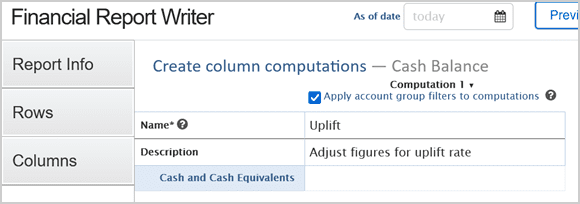
Name computation columns
Until now when a computation column was added to a financial report, it appeared as Computation 1, Computation 2, etc… Now you can name and describe each computation column.
Sage Intacct Cash Management
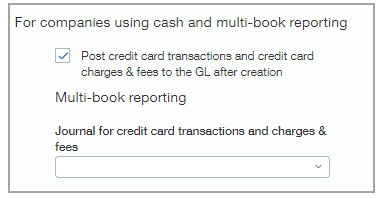
Credit card transactions post automatically to General Ledger
Previously, in cash and multi-book companies, credit card transactions were only posted to the General Ledger after they were paid. This meant you were not able to see the expenses until they were posted, which could affect your accounting decisions and insight. You now have the option to post credit card transactions and fees to the General Ledger as soon as they are created.
Create draft matches for journal entries
Now, when you manually create a journal entry to match against a bank transaction for reconciliation, the two transactions are linked and become a draft match. This can save a lot of time than having find the journal entry later, and also helps to prevent creating duplicate journal entries.
Sage Intacct Accounts Payable and Accounts Receivable
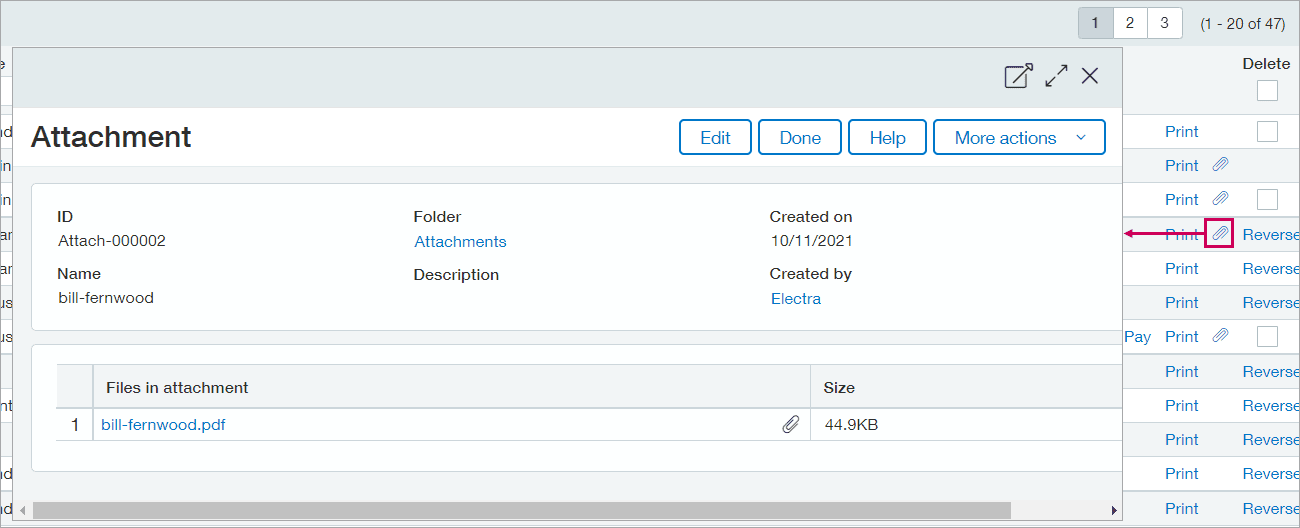
View attachments – (Accounts Payable)
Previously you had to open AP Purchase Invoices one by one to view attachments. Now, you can open attachments directly from the Purchase Invoice list. For Purchase Invoices that include one or more attachments, there is an option to view attachments without having to open up the invoice.
Approve payments list enhancement – (Accounts Payable)
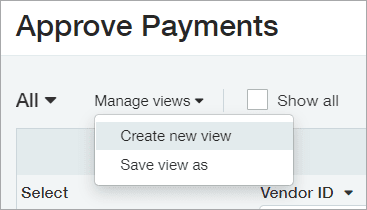
This idea was requested by many Sage Intacct users. You now have the ability to customize your Approve Payments list to the way you want. Added features are listed below:
- Apply Complex Filters.
- Create and save custom views.
- Export the list to print, share or view in a different application.
General ledger posting details – (Accounts Payable and Receivable)
You guys come up with some great ideas, and here’s another one. Sage has now added a Posting Details tab to appear on more transaction pages. This tab enables you to quickly validate how transactions are posted to the General Ledger without having to run the General Ledger report. List of which pages the tab has been added to:
- AP Purchase Invoices
- Adjustments
- Posted Payments
- Invoices
- Customer Advances
Opening and closing sub-ledgers – (Accounts Payable and Receivable)
You can now use the audit trail to track which users have opened or closed the Accounts Payable and Receivable Sub Ledgers.
Sage Intacct Inventory Control
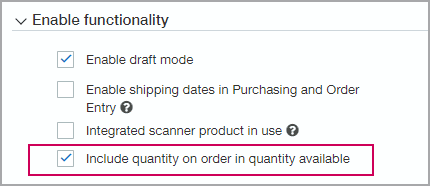
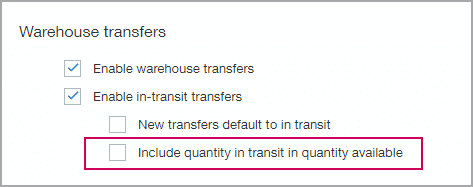
Flexibility on how quantity available is calculated
You can now decide whether or not the quantity available includes on order, in transit or both. Two checkboxes have been added to the configure inventory control page, which affects the calculation of quantity available.
Sage Intacct Order Entry
When entering Orders for inventory items, Sage has made it more efficient by having the quantity on hand and quantity available readily accessible for each line item. You no longer have to open the Details area for the line and click on Available Quantities which would then open up a report to see the quantities.
Sage Intacct Taxes
Reverse charge support for the UK
Improvements have been made to the way reverse charges are processed. You can now input a negative charge as part of a line item in an Accounts Payable adjustment transactions. Previously, you could only process a reverse charge by creating a negative Purchase Invoice as an Accounts Payable adjustment. With the new process, you can easily update adjustments and associated payments to process reverse charges for your entities based in the United Kingdom.
Conclusion
Above is only a brief insight into what we think are the most useful additions in the new 2021 R4 release. If you have questions about any of the above changes please get in touch.
If you are not a current Sage Intacct customer and would like to learn more about the product, click here. You can also watch an on-demand demo of Sage Intacct in your own time, this demo is 25 minutes long and will give you a great understanding of the product, you can watch it here.


Callum provides 1st line support for all our Sage software solutions. As a newer member of the Itas family, he is always looking to improve his knowledge around Sage and is learning about new modules and add-ons regularly.
When he’s not in the office, he enjoys to be outdoors, you’ll either find him playing football or riding his mountain bike around a forest.
