
Making Integrating with Sage Software Easy
Book a call with our Integration Team >
Why Should You Integrate?
In today’s fast-paced digital world, integrating your software platforms can boost efficiency, streamline workflows, and improve productivity. Seamlessly integrating your software is a game-changer for businesses, ensuring that information flows effortlessly between systems and brings benefits such as:
Eliminating the need for manual data entry
Reduction in human error
Speeding up fulfilment times
Data consistency between your systems
Whether connecting Sage 200 to your web ordering system or integrating your CRM software with Sage Intacct, integrating software is an essential step in streamlining and enhancing business operations.
Sage Products We Integrate
Sage Intacct
- Built on a Cloud based platform
- Multi dimensional accounting
- Salesforce integration
- Automate complex processes
- Intuitive dashboards & reporting
- Flexible API integration

Sage 200 Professional
- Multi Company & multi location
- Advanced currency management
- Powerful stock management
- Manufacturing module
- Connected CRM
- Specialised invoicing module

Sage 200 Standard
- Multi Company
- Three tier nominal structure
- Foreign Currency
- Company Consolidation
- Automated Bank Feeds
- Powerful Reporting Tools

Sage 50
- Cloud connected features
- Microsoft Office 365 integration
- GoCardless & Bank Feed Rules
- CIS modules
- Ideas hub
- Excel reporting
“The ability to shift to real-time reporting and our need to streamline our finance processes was the reason we selected Sage Intacct. I chose Hannah and her team at itas because of their consultative approach and the time they took to understand our needs and objectives. It is clear that they have the skills and depth of experience to deliver the right service for a complicated project like ours.”
Tools We Use


BPA (Business Process Automation tools)
These middleware solutions allow us to create customised business process workflows and utilise prebuilt connectors such as:
- eCommerce (Shopify / BigCommerce / Magento / WooCommerce)
- CRM (Salesforce / HubSpot)
- Payment systems (Go Cardless / Stripe)
API (Application Programming Interface)
API's are a set of rules enabling different software to communicate and exchange data.
- Sage 200: APIs connect Sage 200 with other systems like CRM or e-commerce platforms for data integration.
- Sage Intacct: APIs help integrate Sage Intacct with other apps, streamlining processes like financial reporting, invoicing, or data sync.

Pre-Built
Integrations
Ready-made solutions that connect different software systems without requiring custom development.
- Qmulus Sage CRM Connector: Integrates Sage 200 with Sage CRM.
- Advanced CRM Salesforce Connector: Links Sage Intacct or Sage 200 with Salesforce, enabling real-time syncing of customer, sales, and financial data.
Explore Advanced Salesforce Connector >
What are your options for Integrating?
These are some of the most common integration types:
Data Transfer
Reducing manual entry by synchronising information between systems
Reporting
Automated reports providing real-time insights for faster decision-making
Alerts & Notifications
Real-time communication alerting users/management about important system events
Process Automation
Initiate tasks when certain criteria is met allowing for a more agile, responsive, and efficient operational environment
Whether you are automating routine tasks or enabling more advanced analytics, the right integration strategy can transform how your business functions, giving you a competitive edge and empowering teams to focus on what truly matters.
Our Approach to Integrations
A crucial part of integration is understanding the objectives and defining what your business aims to achieve. We work closely with your team to assess business processes, workflows, and identify which software systems need to be integrated.
How We Work with Your Business
Key Controls We Implement
The team here at itas will work with you using a range of skills and tools to create an integration that should fulfil your company’s needs and meet your business objectives.
Book a call with our Integration Team >
Use Case Scenarios for Integrations
Integrating Finance Systems with Web Orders
Streamline your order process by integrating your finance software (such as Sage 200 or Sage Intacct) with your web order platform. This ensures that:
- Orders placed online are automatically reflected in your accounting system.
- Inventory levels are updated in real-time, preventing over-selling.
- Customer payments are tracked accurately, reducing discrepancies between departments.

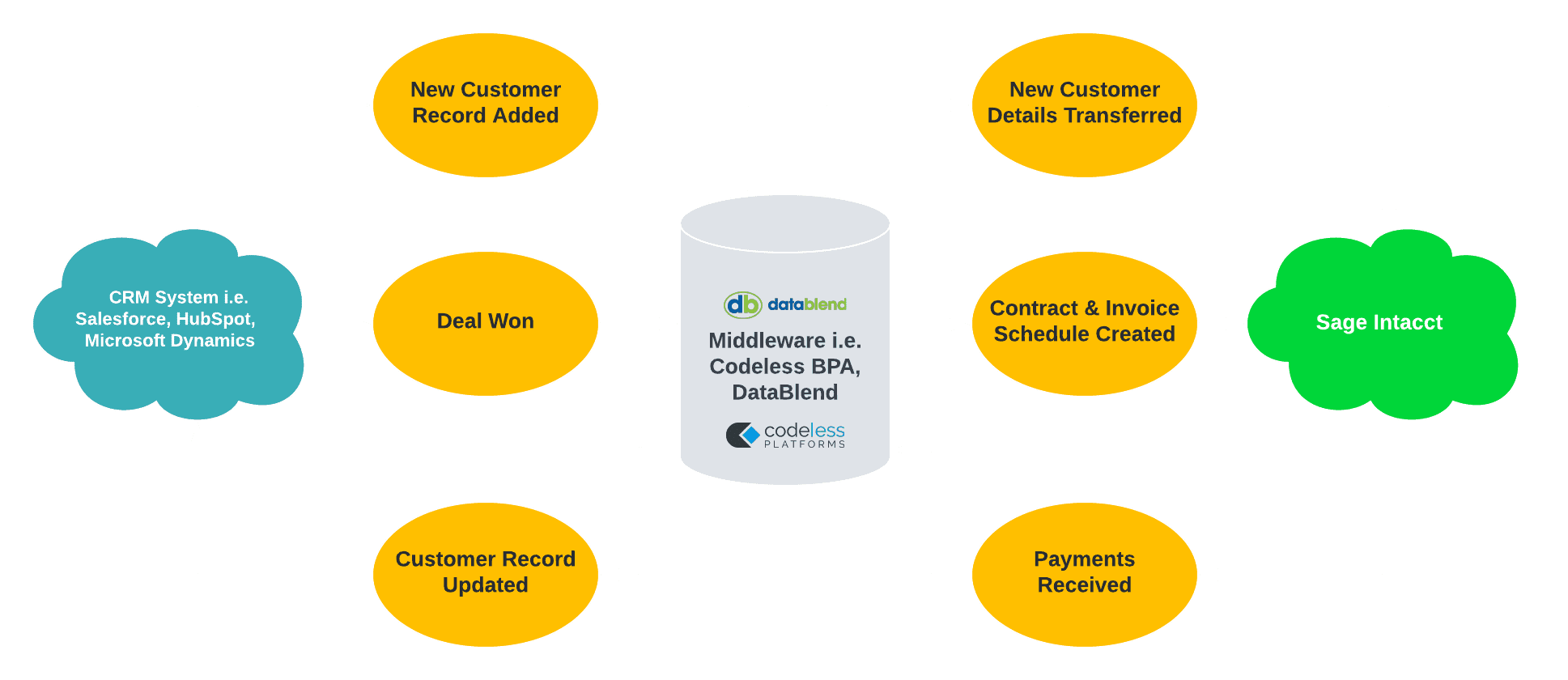
Integrating CRM with Financial Systems
Keep your sales and finance teams on the same page by integrating your CRM (such as Salesforce) with your Sage software. Benefits include:
- Automated credit management from CRM data.
- Real-time insights into sales performance and outstanding payments.
- Automating the generation of quotes and orders in your financial software based on deals or opportunities converted in your CRM system.
Monitoring and Reporting on Financial Systems
In a workflow, purchase orders are entered into Sage 200 by employees or third-party software and require authorisation prior to submission. To enhance this process, an integration could provide the following functionalities:
- Immediate Notifications: Automatically alert the appropriate individuals of pending authorisations, thereby minimising delays in processing.
- Status Updates: Inform relevant users promptly when authorisation has been granted.
- Escalation Protocols: Automatically escalate unresolved notifications to designated personnel, ensuring that no issues are overlooked.

Speak to an Integration Specialist
Speak to one of our Integration Specialists today and discover how we can streamline your workflows, reduce manual data entry, and unlock the full potential of your Sage system. From finance to operations, we’ll help you create a customised integration strategy that fits your unique business needs.
Ready to get started? Contact us now for a consultation!

FAQs for Integrating with Sage
The cost of an integration can vary based on several factors, including the complexity of the systems involved, the amount of data being transferred, and the specific requirements of the integration. The type of integration needed, along with the tools and technologies required will all need to be considered.
