
Get in Control of your Purchasing with Sage 200
Ensure you have controls at each step of the purchasing cycle with Sage 200
Sage 200 can help you not only get visibility across your entire business but can also ensure you have controls at each step of the purchasing cycle. Move away from managing your purchasing on paper and instead into sage 200cloud with the ability to enter requisitions and purchase orders.
Automate your processes
Get better reporting and insights into your purchasing
Get in control of what you are spending
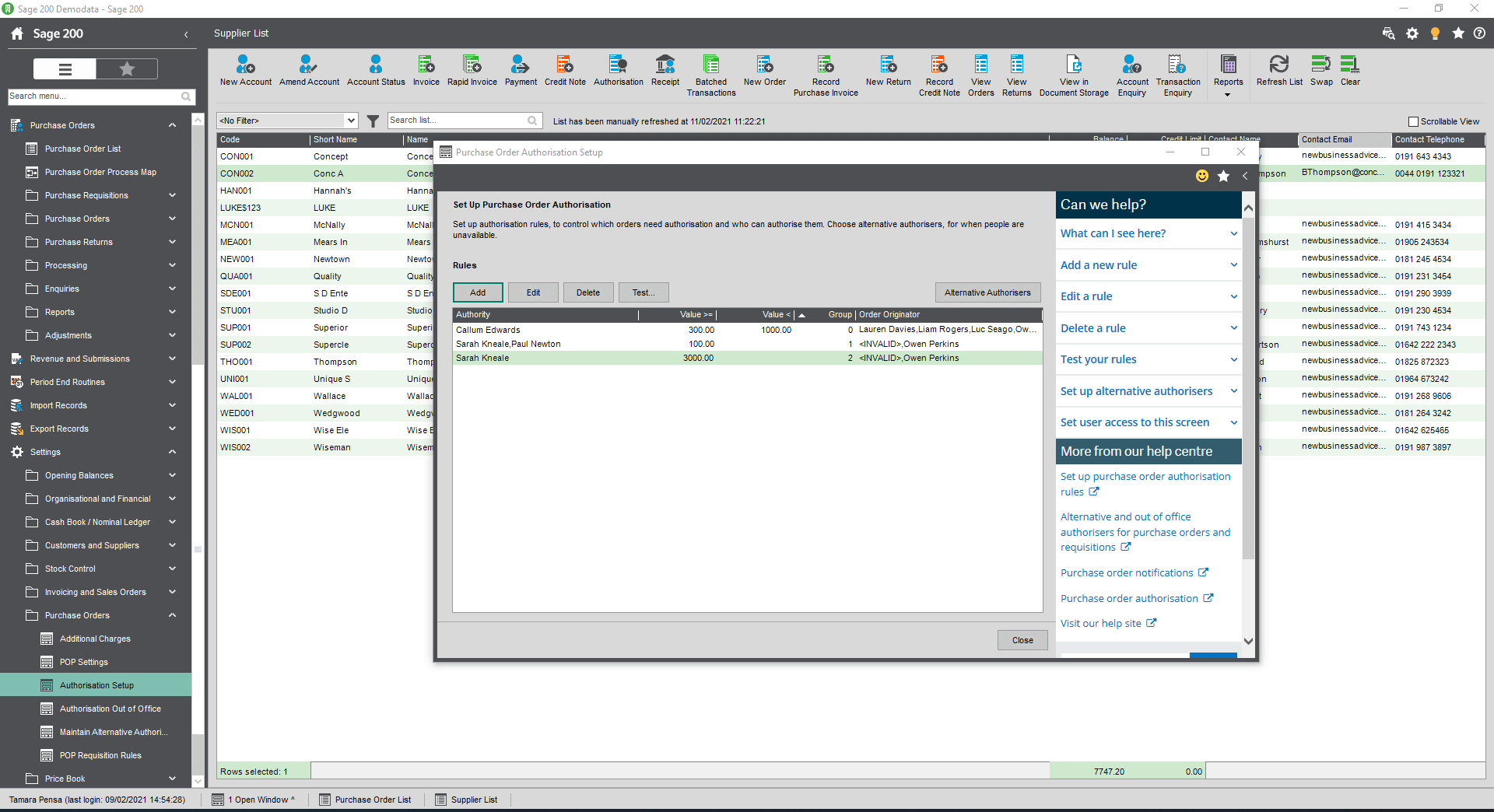
Set up authorisations for requisitions and purchase orders so that you keep control of your costs.
3-way match purchase invoices against purchase orders and GRNs to ensure you only pay the invoices you should be paying.


Stop duplicate entries with the option to check if an invoice already exists.
Attach copies of supplier quotes, invoices and goods received notes within the system for easy access.
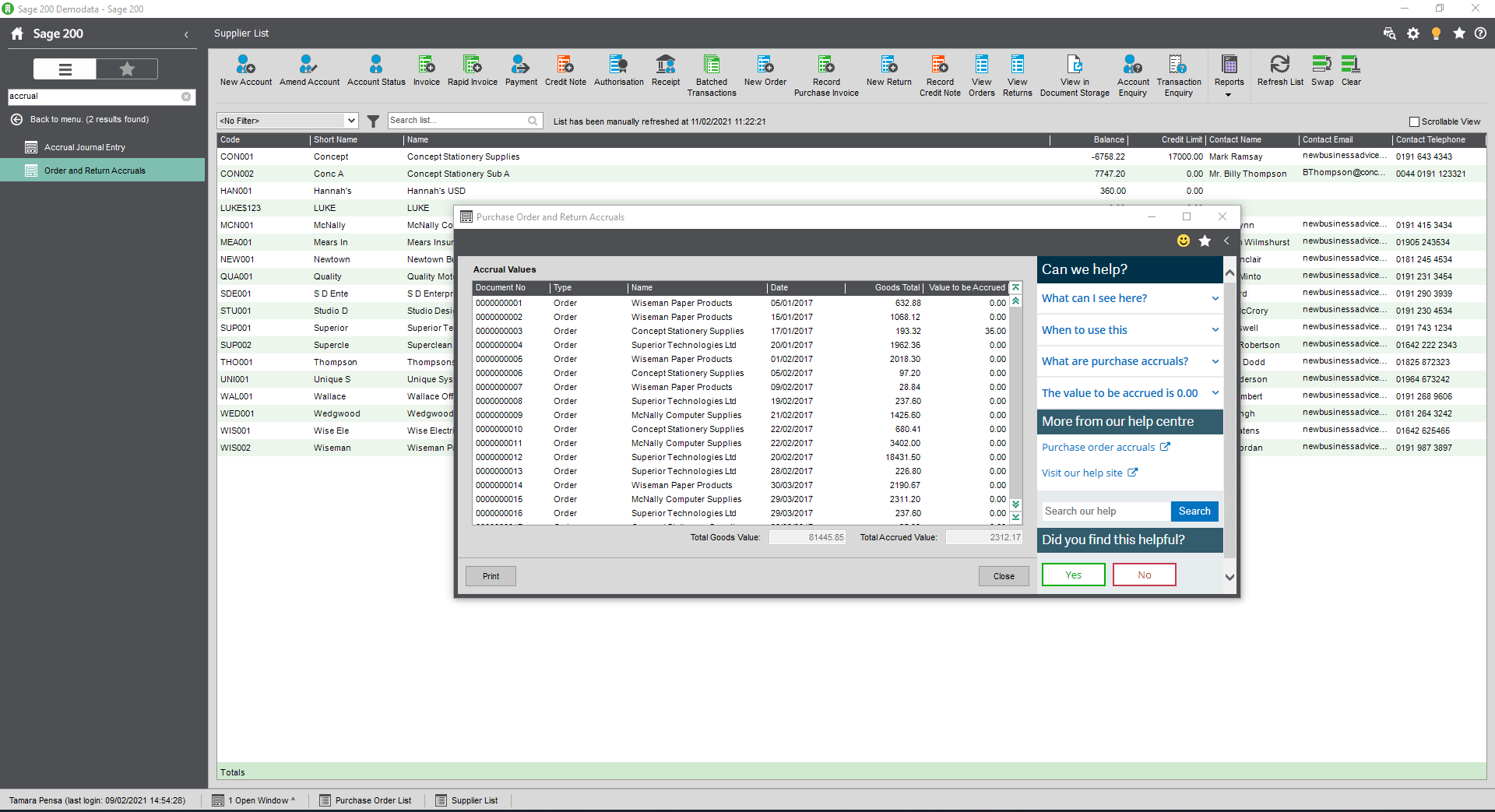
Auto-generate accruals postings based on purchase orders that have been received but not invoiced.
Automate your purchasing cycle with a suite of tools including the stock planning module.

Sage 200 gave Pukka Pads visibility of global operations within one system:
“Sage 200 helps us work as a group and allows for consolidation of financials and stock, which are key across a global brand. Our business can’t work without Sage.”
Sage 200 Purchasing Modules
Purchase Ledger
Sage 200's Purchase Ledger allows you to keep track of all your credit notes, invoices and discounts sent across to you by your suppliers. Manage foreign currency transactions, enter transactions individually or in batches, authorise your invoices and credit notes and produce standard reports, with ease with Sage 200.
Purchase Order Processing
Generate purchase orders in Sage 200 by bringing together your supplier information and the goods and services that you purchased. Record purchase orders, enter purchase requisitions, generate suggested purchase orders and manage goods received using the powerful POP functionality in Sage 200.
OCR Scanning
Scan, drag, drop and allow documents such as purchase invoices to be imported into Sage 200 with ease. In Sage 200, you can even match invoices against PO's automatically. If they don't match, you can use the authorisation functionality to ensure that the right staff member is notified and the invoice is then put on hold until approved. Sage 200 allows you to free up your team to do more important things and automates the matching for you.
Reports & Dashboards
Sage 200 boasts a range of reporting tools helping you gain visibility across your entire business. The Excel reporting tool within Sage 200 allows you to build customised Excel reports that connect directly into the Sage 200 data. Sage 200's integration with Microsoft Power BI helps you unlock powerful reporting and dashboards, giving you web and mobile access to graphical dashboards that give you instant visibility. Sage 200 also comes with an inbuilt reporting tool called Sage 200 Report Designer, giving you an easy-to-use, drag and drop and drop interface, allowing you to build your own custom reports.
Take a Tour of Sage 200
Take a tour of Sage 200 at your own pace and find out if it is the right solution for your business.
Why choose itas as your Sage 200 partner?
At itas, we believe in working in partnership with you to deliver the perfect solution that you want and need for your business. As a multi-award winning Sage Partner, our approach is to help you maximise technology to transform the way you work.
The change to any new platform is a journey, and we will be on that journey with you, every step of the way.

