
Sicon Fixed Assets for Sage 200
Whether you’re managing a few key assets or thousands, Sicon Fixed Assets provides powerful tools like forecasting for budgeting, asset revaluation, and detailed reporting.
Enquire Now >
Manage Your Fixed Assets Seamlessly with Sicon Fixed Assets
Tracking and managing your fixed assets shouldn’t be a burden. Sicon Fixed Assets integrates seamlessly with Sage 200, providing a user-friendly solution for asset management. From acquisition to disposal, it simplifies every aspect of fixed asset tracking, helping you save time, ensure compliance, and gain full visibility of your asset portfolio.
Why Choose Sicon Fixed Assets?
Effortless Asset Management
Easily add new assets manually or via CSV imports, streamlining asset acquisition and tracking.
Seamless Integration
Fully integrates with Sage 200, linking directly to ledgers and month-end processes for smooth operation.
Multiple Depreciation Methods
Supports a range of standard depreciation options and allows for custom user-defined methods.
Comprehensive Traceability
Keep track of asset locations, employee interactions, transaction history, and maintenance records.
Simplified Period and Year-End Processes
Automate depreciation postings and handle brought-forward adjustments effortlessly.
Insightful Reporting Tools
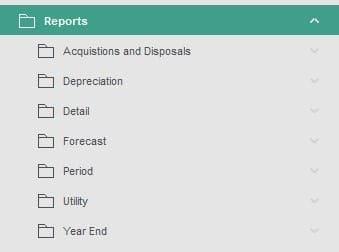
Generate detailed reports for acquisitions, disposals, depreciation, forecasts, and more to support decision-making.
"The Fixed Assets module in Sage 200 has given us far greater control. Previously, we relied on a spreadsheet and manual formulas to calculate depreciation each month. Now, everything is integrated into Sage 200, allowing me to calculate depreciation with the press of a button. I can also access detailed information for each asset, providing a level of precision and oversight we didn’t have before."
Key Features of Sicon Fixed Assets
Flexible Asset Acquisition and Traceability
Sicon Fixed Assets allows for effortless creation of new assets during invoice posting. When processing a purchase invoice with a fixed asset nominal code, you can create a new asset instantly or link the invoice to an existing asset. This streamlines the acquisition process while maintaining full traceability through the asset's transaction and maintenance history.
Streamlined Revaluation Process
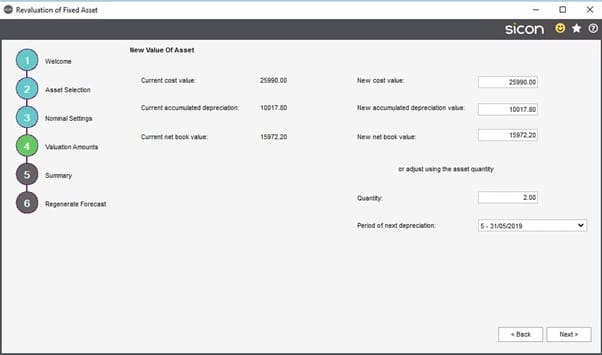
Revaluing assets is simple and efficient with the revaluation wizard. You can adjust an asset’s value by selecting it, entering the reason for revaluation, and updating the net book value. The wizard ensures all adjustments are compliant and accurate, with options to amend values before finalising the process.
Comprehensive Additional Information
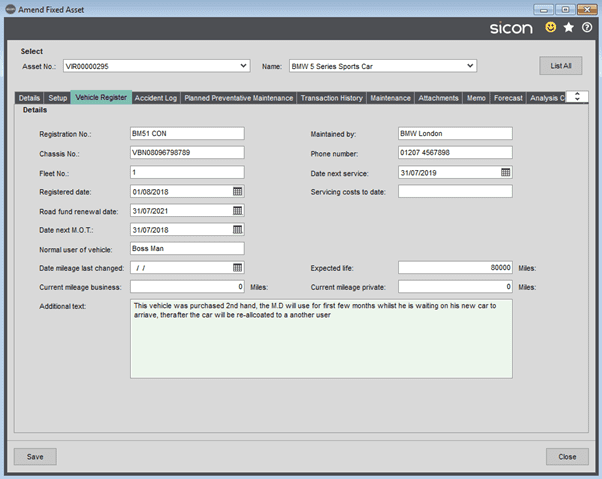
Enhance traceability with detailed information for each asset. Sicon Fixed Assets allows you to log employee interaction, locations, vehicle data (e.g., registration and mileage), accident history, and planned maintenance. This level of detail makes it easier to manage a diverse asset portfolio and comply with reporting requirements.
Period and Year-End Routines
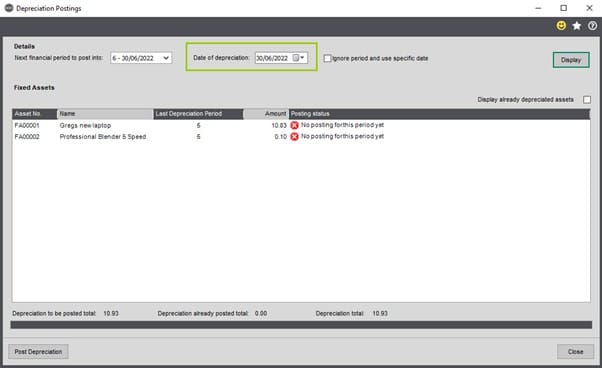
Simplify your period and year-end processes with automated depreciation postings linked to the Sicon Fixed Assets module. The system supports automatic journal entries for opening balances and brought-forward postings, saving your finance team valuable time.
Customisable Depreciation Methods
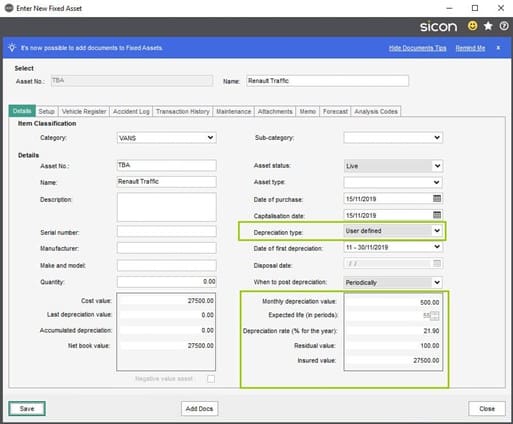
Choose from multiple depreciation methods, including user-defined options. This flexibility ensures your assets are depreciated according to your specific requirements, whether for tax purposes or internal financial reporting.

Powerful Reporting Tools
Generate insightful reports on acquisitions, disposals, depreciation, and more. Sicon Fixed Assets includes standard reports that provide detailed breakdowns, making it easier for your finance team to monitor and manage your asset base effectively.
Sicon Fixed Assets FAQs
Yes, the revaluation wizard allows for quick and compliant revaluation of assets, ensuring accurate book values and depreciation calculations.

Speak to a Sage 200 Specialist
If you have any questions about Sage 200 and Sicon, would like to organise a personalised demo or if you would like to talk about how much Sage 200 costs, fill out the form below and a Sage 200 specialist will give you a call back at a time that suits you.
Why choose itas as your Sage 200 partner?
At itas, we believe in working in partnership with you to deliver the perfect solution that you want and need for your business. As a multi-award winning Sage Partner, our approach is to help you maximise technology to transform the way you work.
The change to any new platform is a journey, and we will be on that journey with you, every step of the way.
