
The days are getting longer, and the sun is starting to shine. Hopefully, you all have holidays booked to enjoy the summer and recharge from a long winter! But, before you start packing your suitcases and jet-setting to foreign lands, Sage has just released its 2nd quarterly release for the year. So, you might want to stick around to see what’s new in this update.
We know you have a busy schedule, so in this blog, we like to get to the good stuff and show you the main highlights of the release.
If you have the time and want to read the full details of the release, all of the notes are available here!
Release Highlights
Cash Management
Bank Transaction Assistant Import File
Sage has provided a new way to import your bank transactions for reconciliation. This new import file focuses on flexibility, control, and visibility for ease of use.
- Imported transactions appear in a centralised location for all bank accounts on the Bank Transactions page.
- Transactions you import remain in Sage Intacct, even after reconciliation.
- More file formats are supported, giving you extra flexibility.
- You can increase control of who imports bank transactions using permissions.
- A new import activity list provides added insight.
For more information click here.
Bank Matching Sequence report
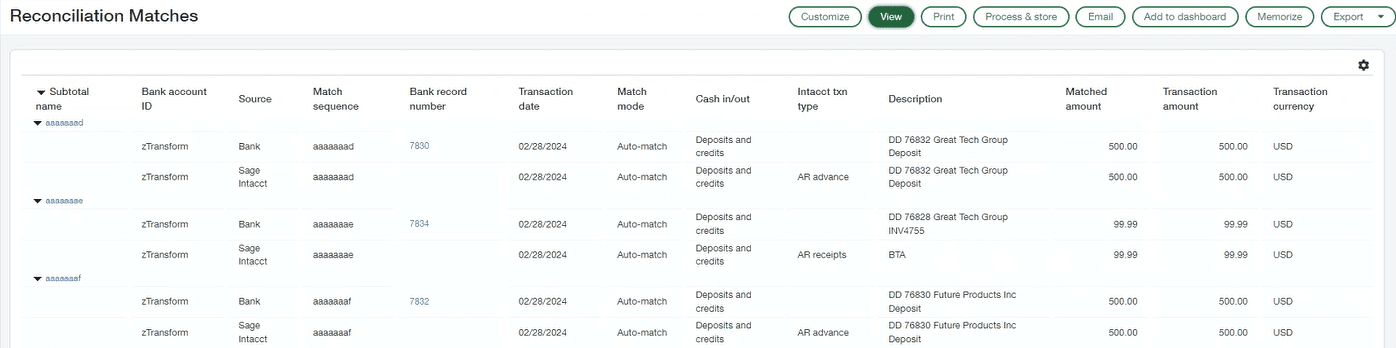
You can now run a new prebuilt custom report to see which Sage Intacct transactions matched which bank transactions.
Run the new Detail of Reconciliation Matches Report from the custom reports area. Set your desired parameters and then you can view both the bank transactions and Intacct transactions.
For more information click here.
Time & Expenses
Sage Intelligent Time is generally available for all users
Sage Intelligent Time (SIT) is an AI-powered timesheet solution for tracking time against projects. The AI intelligently gathers and organizes activities during your workday. It then suggests the activities to be included in your timesheet along with other information such as client, project, and task.
The embedded experience allows you to access Sage Intelligent Time directly from the time and expenses or project applications in Sage Intacct, eliminating the need to manage timesheets in a separate platform.
Now that SIT is integrated into Intacct, if you are using the standalone version of SIT it will be discontinued on August 9th, 2024. After this date, users will access SIT through Intacct and log in with their Intacct credentials. If you would like to transition to Intacct sooner, please contact your account manager.
Click here for more information.

Purchasing
Pay for services with blanket purchase orders
This feature allows you to purchase services and other non-inventory items against a set purchase amount.
An example of this would be if you have a project that has an approved spending amount with a consulting firm for billable hours, you can now set up a blanket purchase order for the contracted amount. Then you draw down the purchase order as services and non-inventory items are consumed during the project. This helps for visibility on the project as previously you could only go off the quantities, but now you can see the converted amounts and keep track of the remaining amount on the purchase order. Previously
For further information click here!
Fixed Assets Management
Sage has just announced Sage Fixed Assets Management (SFAM), a new solution designed for Sage Intacct and available for everyone.
Customers currently using SIG Fixed Assets cannot migrate to Fixed Assets Management yet. SIG Fixed Assets will continue to be supported.

For more information click here!
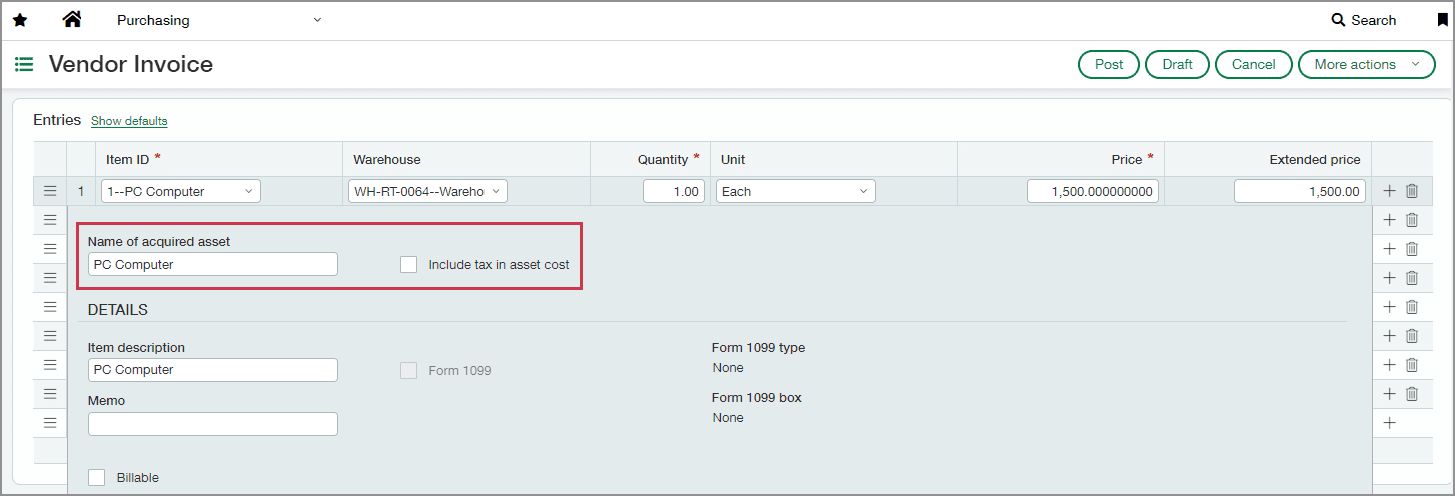
Create assets directly from purchasing transactions.
This useful feature helps to streamline your data entry process and match your invoices to your assets. Assets are automatically created at the time of their acquisition.
- Sage Intacct checks if the items in a transaction are associated with an asset classification. This association is defined in the transaction definition’s posting configuration.
- If a match is found, you provide a name for the new asset on that line item.
- When the transaction posts, it creates an AP bill, which then generates an asset. You can review the asset to add additional details.
- The new asset is automatically tagged as a dimension on the transaction, bill, and posted journal entries.
For more information click here!
Conclusion
This has been a list of our highlights from the latest Sage Intacct R2 Release.
The Sage team works tirelessly to improve the experience of Sage and truly values their customer’s opinions and feedback. If you didn’t know, the majority of the updates and new features in this release come from end users’ feedback and suggestions.
If you are a Sage Intacct end user and have some good ideas for updates or improvements, you can have your say by clicking this link. You may just see your suggestion in a future update!
If you enjoyed this blog and are looking for more information like this about Sage Intacct, we have a quarterly newsletter that would be perfect for you. The newsletter will include links to the latest blogs, webinars, and free downloadable guides to help you get the most out of your Sage software.
If you are looking at Sage Intacct as your next finance platform but aren’t sure if it’s the right solution for you, we also provide on-demand demos that allow you to see the features and learn more about the system.


Callum provides 1st line support for all our Sage software solutions. As a newer member of the Itas family, he is always looking to improve his knowledge around Sage and is learning about new modules and add-ons regularly.
When he’s not in the office, he enjoys to be outdoors, you’ll either find him playing football or riding his mountain bike around a forest.
