
With end of life approaching for Sage Financials, upgrades to Salesforce are still being rolled out which will benefit Sage Financials users in the short term. As a Salesforce user or a current Sage Financials user, some benefits for you to look forward to within this upgrade are Sandbox previews, split list views, Einstein search, and of course, an adorable new Salesforce Mascot!
Before we dig deeper into the summer upgrade, please note that as a Sage Financials user the deadline for moving off the platform is at the end of this year (2020). We have an on-demand recording of a webinar we released earlier in the year called ‘Life after Sage Financials‘ which you may find useful if you’re wondering what your next steps should be.
Salesforce Sandbox Previews
Sandbox previews are getting rolled out on May 29th and as a Sandbox customer, this means that you can test customisations and new features in your sandbox before your production organisation is upgraded. This is a great new feature because it allows you to check the impact of upgrades on a duplicate of your production environment without having any direct impact on your business; allowing you to iron out any kinks or disruptions before deploying to your live Salesforce instance. Please be aware that you will need to make sure your sandbox is no longer active on the Spring 2020 preview instance and is instead active on the Summer 2020 preview instance. As it stands, sandbox instances are split into preview and non-preview groups. Your non-preview instances will be upgraded towards the end of the release as well as the majority of production instances whereas your preview instance will be upgraded to the new version before. Another thing to be aware of is that as a sandbox customer if you have an active preview instance before the roll-out date, you can get early access to the sandbox previews.

The new Salesforce Sandbox Previews comes paired with a new Salesforce Mascot, I’m sure we can all agree that it is very cute!

Split List Views
Another great new feature being rolled out in the Summer upgrade is split list views. This new feature will allow you to see both a record and a list view side by side, eliminating the need to work through multiple records within a list. To move into a new record, select it from the split view, and whilst the list is still in view the new record will open.

Image source: Salesforce Release Notes
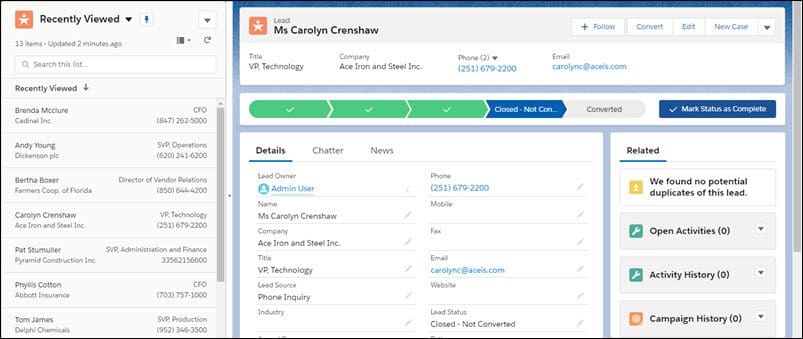
Image source: Salesforce Release Notes
Most of Sage Financials and Salesforce users will find this new feature really exciting, it is great for skimming through a batch of records or going through records in sequence.
Salesforce Einstein Search
Some of you may not know that Einstein search is available at no extra cost when using Salesforce, you just need to switch it on! This isn’t a new feature per se, but it is worth mentioning as some people may not be using it, or are unaware of its capabilities. To turn on Einstein Search, within the setup quick find box, type ‘Enable Einstein Search’ and then select ‘Enable Einstein Search’. Einstein search learns from each user; it provides you with suggested search results and displays records with more context. Each one of your users gets actionable and personalised search results within Salesforce along with Einstein tips, suggested searches and lists, and recent items. Another benefit is Einsteins Search’s use of ‘natural language’, this enables users to search in a more natural tone in the same way you would when doing a search on Google for example. Einstein is incredibly intuitive and the more you use it the smarter and more useful it gets. If you haven’t turned it on yet, it is definitely worth it!
Exporting Sage Financials Data for Migration
This section isn’t a new Summer Upgrade addition but more for users of Sage Financials who need to export their data and migrate away from Sage Financials. Before going ahead with data migration, you must ensure your data is accurate, up to date, and reliable. Sage has put together a really detailed data migration guide that you can follow to ensure you export the right data out of your Sage Financials system, you can view the guide here.
Conclusion
Those of you who are reading this blog as a Sage Financials user, if you’re still unsure of your next steps or would like to speak to a Sage specialist you can get in touch with us, we’re happy to help! For many of our Sage Financials customers, their migration path has lead them onto alternative Sage Products, such as Sage 200cloud and Sage’s new flagship product, Sage Intacct. We have a range of resources that may help you find your next business management software:
- Life After Sage Financials (on-demand webinar)
- Sage Intacct Demos & Overviews (on-demand webinars)
- Sage 200cloud Product Tour
- Sage Intacct Product Tour


We are a multi-award-winning, platinum Sage Partner, specialising in Sage 200 Professional, Sage 200 Standard, Sage Intacct and Sage 50 accounting solutions.
At itas, we believe in working in partnership with you to deliver the perfect solution that you want and need. We will design a tailor-made business management solution specifically for you and your business, giving you the freedom to focus on what you do best.
