
The first quarterly update for Sage 200 Professional was released last month and it offers some exciting new features and expands on the ones you’ve come to know and love!
With 31 extra web forms, this update frees the shackles of the desk with a theme of remote working and working on the go.
We’ve seen in the recent past that the world can change rapidly. That’s why flexibility and dynamic working can give you freedom and peace of mind.
Without further ado, let’s take a look at the features and functionality of Sage 200 Professional 2022 R1!
New Web Forms
- Create Sales Order
- Amend Sales Order
- View Sales Order
- Sales Order List
- Memo Tab
New Quotes web Forms
- Create Quote
- Amend Quote
- View Quote
Web Portal Quotations and Sales Orders
Quotations
Quotations can be found in the web portal by going to Sales Order Processing > Quotations, you now have the option to create a New Quotation or Amend an existing Quotation.
The functionality of quotes has been bolstered with fields and features for expiry dates, memo tabs, additional status, and an account on hold warning. (You can still generate quotes for accounts on hold, but you will not be able to change the quote to a sales order until the account is off hold.)
You’ll show your customers that you know their business with quotes personalised for them.

From this screen, you can create quotes for existing customers and also new prospects.

Alternative Items and Cross-sell
If you do not have a particular item in stock, you now have the option to select and suggest alternative items and also add cross-sell items. (The alternative items and cross sell items will have to be set up in Sage beforehand). This can be extremely useful if you don’t have a timescale for an item to be back in stock, and for saving time searching for additional items. (This applies to both Sales Orders and Quotations.)

Discounts
When creating a Quotation or a Sales Order, it is now possible to view the order line discount breakdown. Now your salesperson can immediately see and apply discounts, proactively responding to your customer needs.
It also provides sales managers insights into how the discounts are used and the impact on revenue and pipeline.

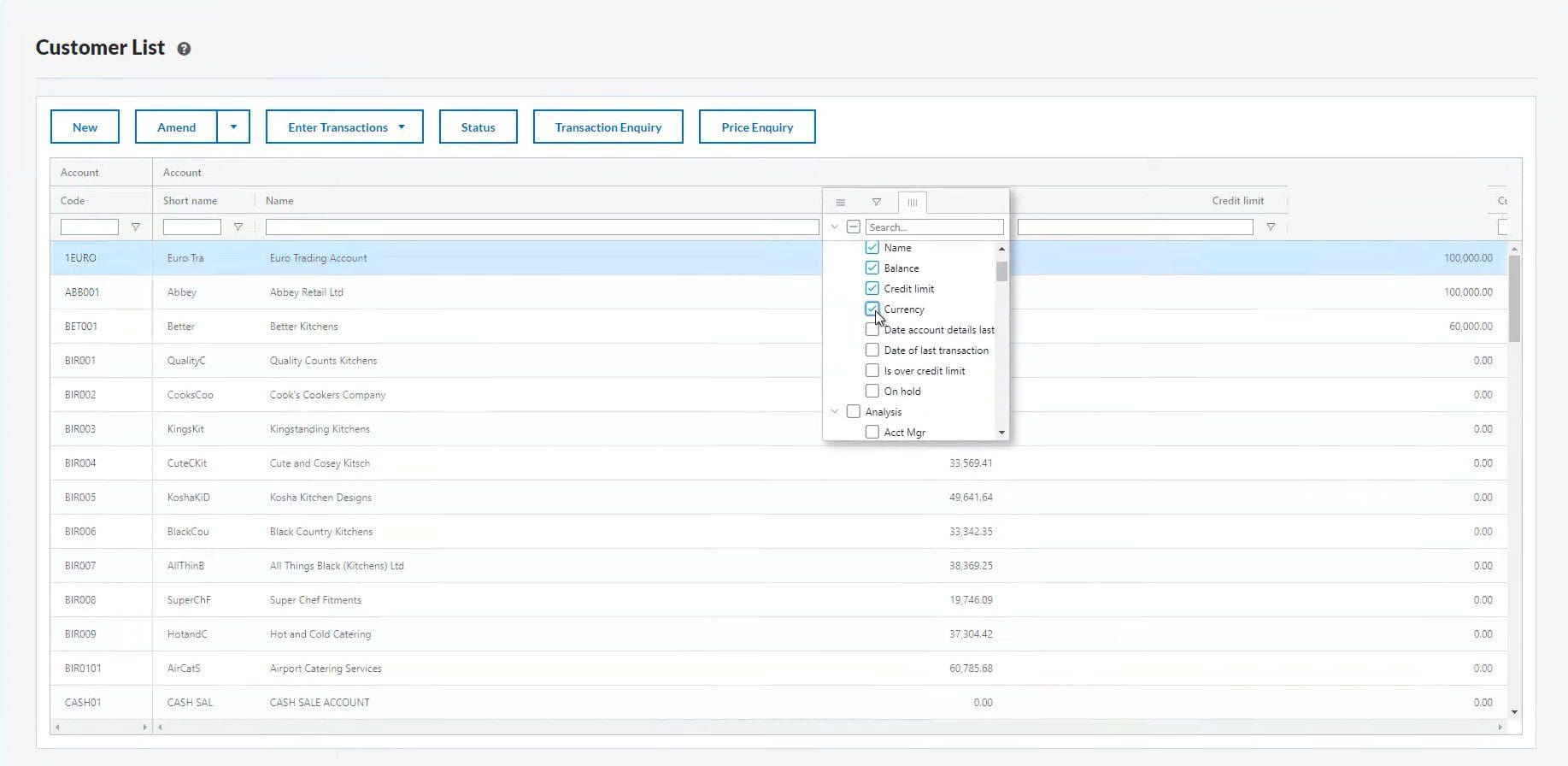
Web Screen Customisation
You can now edit web screens further to give you the information relevant to your role and processes! You can remove and re-order columns and the web screen will now remember a selection.
To do this click on the menu icon on any column, then tick the columns you want to see on your screen.
Web Screen Functionality
Web Screens have just become more powerful, with direct email and print functionality, this might mark the end of the “wait until I’m in the office” mindset.
Conclusion
The Sage 200 Professional 2022 R1 update is clearly focused on the cloud and web side of Sage and one really has to jump into those new screens and features to get a feel for what this update brings to the table.
Most importantly though, these features and screens are immediately approachable and intuitive and you don’t need to be the most experienced user to benefit from them!
For more information, you can download Sage 200 Professional’s R1 datasheet from here.
Useful Links


Jamie is a passionate and supportive member of the ITAS support team! He likes to keep his hands busy with hobbies like model-making and web development and is always keen to develop new skills.
When Jamie’s not working hard on a project, he’s enjoying the Welsh countryside by walking its many trails or fishing in its many picturesque lakes.
