
November sees the introduction of the last Sage Intacct release of the year, and with it come plenty of new features and enhancements to improve your Sage Intacct experience.
In this blog, we’ll take a look at how some of the highlights and how they can help improve your financial operations.
Support for term discounts for taxes—General availability
Release 4 sees general availability for taxes being supported in term discounts within the Order Entry and Accounts Receivable applications.
When creating AR Terms, to date users have been able to calculate a discount based on:
- Line-items total, excluding added charges
- AR sales invoice total, including all charges
Following this release, the calculation options have been revised to accommodate taxes:
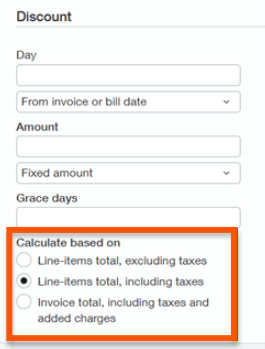
- Line-items total, excluding taxes – this calculation will not apply the discount to any taxes applied to the item. It will apply the discount to the Net amount of the transaction line.
- Line-items total, including taxes – this calculation will apply the discount to the overall line total, including any taxes applied to the item. It will apply the discount to the Gross amount of the transaction line.
- Invoice total, including taxes and added charges – this calculation will apply the discount to the overall invoice total, including any taxes across any lines of the invoice. It will apply the discount to the gross total of the invoice.
When using an AR Term that has a discount applied, the Receive Payments screen will allow you to apply the discount associated with the term when paying an invoice in full. The system will then apply the calculated discount.
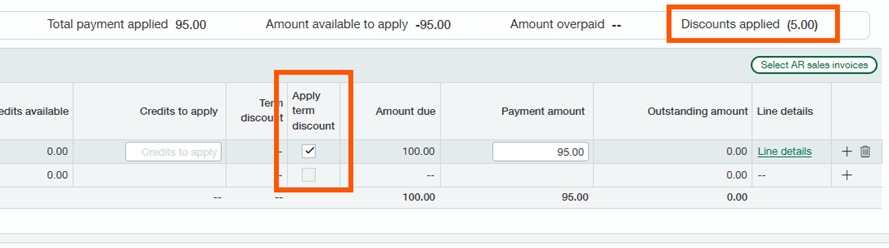
Where a discount is calculated using the invoice total, the system will distribute the discount across the multiple lines of the invoice.
New transaction options when running customer statements
With Release 4, Sage have introduced new methods for filtering transactions to include in customer AR statements.
Going forward users will be able to filter their AR statements to more easily define which transactions should be included, such as including open invoices and credits, or only open invoices.
As a result, users can introduce greater granularity in defining the contents of their AR statements.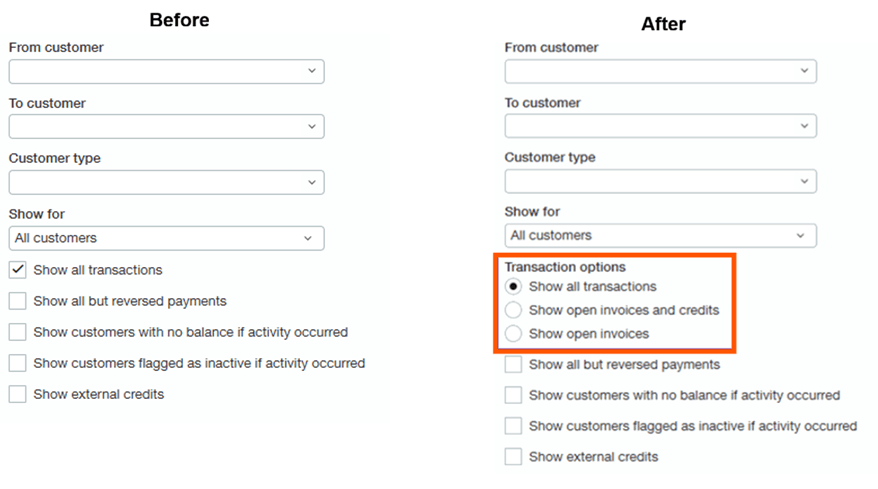
Combine debit and credit transaction amounts for easier matching
Within Cash Management, users have the ability to create Matching Rules which automatically match bank transactions against their identified Intacct transaction.
With the latest release, Sage have widened the functionality to enable you to specific on a Matching Rule where it should combine debits and credits when matching transactions.
Include unposted journal entries in General Ledger reports
When running General Ledger reports, to date only journal entries that have actually been posted will be included.
Following this month’s release, users will now be able to select whether they want to include journal entries that are Posted, Unposted, or both when running the General Ledger or Journals reports.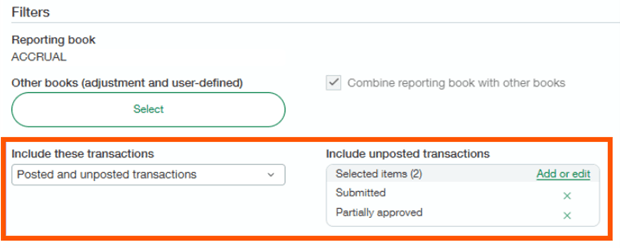
Unposted journal entries will allow you to include any that are in a state of Draft, and if your organisation uses journal approvals, Submitted, Partially Approved, or Declined as well.
As a result, your report will include journals that are part way through an approvals process to ensure you get a more transparent view of your data.
Enhancements to Fixed Assets Management
As part of R4, there are multiple enhancements being introduced to the Fixed Assets Management module:
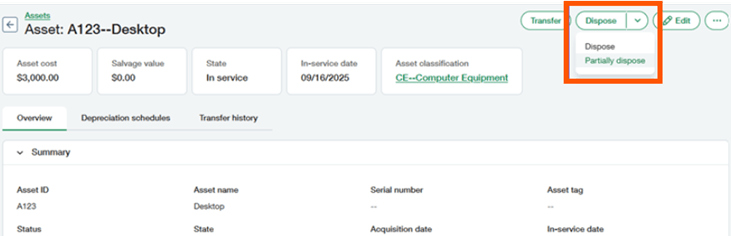
Partially dispose of assets
When disposing of assets, users will now be able to partly dispose of the asset and allow the remaining asset to continue to depreciate. To date, assets have only been able to be disposed of in full.
Create multiple assets from a single invoice line
Previously only a single asset could be created automatically from the line of an invoice.
Going forwards, Sage Intacct will now offer the ability to generate multiple assets from the same line.
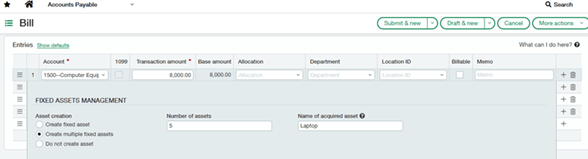
When editing the line, by expanding the Show Details area users will now be presented with an option to create multiple assets. This will allow you to create up to 20 assets from the single invoice line, with the line amount evenly split across the created assets.
Edit asset Dimensions and asset names
To date users have not been able to easily edit the Dimensions associated with an asset. Users have had to transfer the asset.
Following this release, users can readily edit the Dimensions on an asset without the need to formally transfer the asset.
Similarly, users have not been able to rename assets that have already been placed in service or created off the back of an AP Invoice.
Moving forwards users will be able to rename any asset that is in a state of Ready for Review or In Service.
Introducing historical contracts for faster onboarding
R4 is introducing a new way to onboard historical contracts and their associated balances.
Previously going live with the Contracts module involved a process called Active Contract Processing to bring in historical contract data. With the new historical contract process users can simply mark a contract line as being historical when bringing it into the system and only enter open balances.
Anything marked as historical will appear in the contract line’s Transaction History tab.
Conclusion
This has been an overview of some of the highlights from the R4 November 2025 release.
If you are a current Sage Intacct user with ideas for any improvements, click here and have your say on what features you would like to see developed for future updates!
And finally, if you’re not a Sage Intacct user but enjoy having a nosey at the new features in Sage Intacct, we have an on-demand demo that allows you to pick the features you’re interested in learning more about. You can check it out here!

Matthew is one of our Sage Intacct Junior Consultants, working with clients to implement Sage Intacct solutions. With a background in technology implementations, Matthew has years of experience scoping, configuring, and training systems across multiple business functions.
In his spare time, he likes to take his dog for long walks when he’s not watching his favourite football team get beat.
