
The year is already well underway, and February sees the first of this year’s Sage Intacct releases. Release 1 brings us a number of exciting new features and enhancements to existing functionality to improve your finance team’s processes.
In this blog, we’ll take a look at some of the highlights you can look forward to from this month onwards.
Release Highlights
Sage Copilot
Copilot Variance Analysis – General Availability
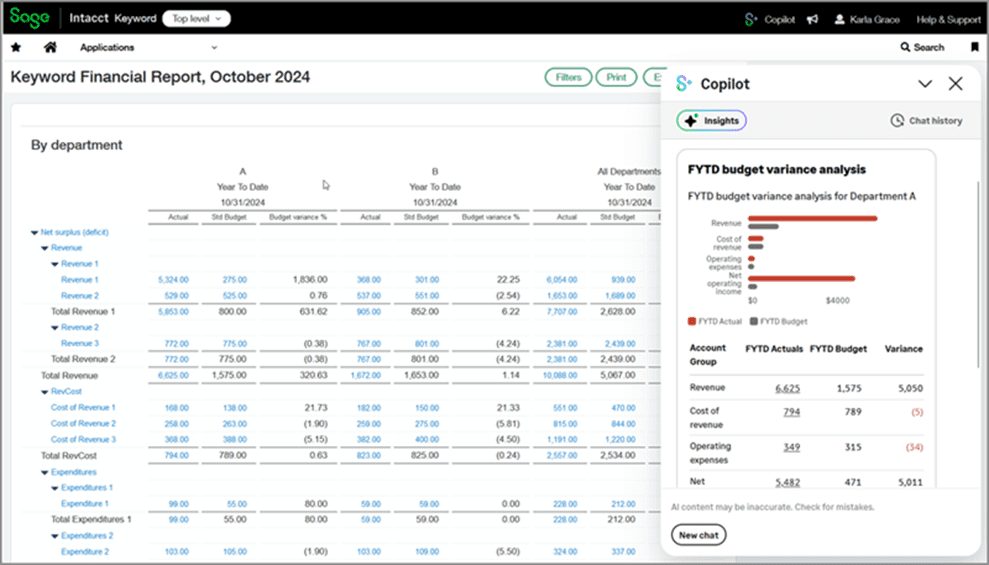
Included in Release 1 is the Copilot Variance Analysis add-on that is generally available. This feature provides various components that will aid you in investigating and resolving issues related to your spending.
Supported features include automated notifications where expenses exceed budget, real-time budget vs actual tracking and data visualisation, and AI-powered variance descriptions that can aid in finding the reasons behind variances.
For more information on this topic, click here!
Early Adopter – Copilot Close Assistant
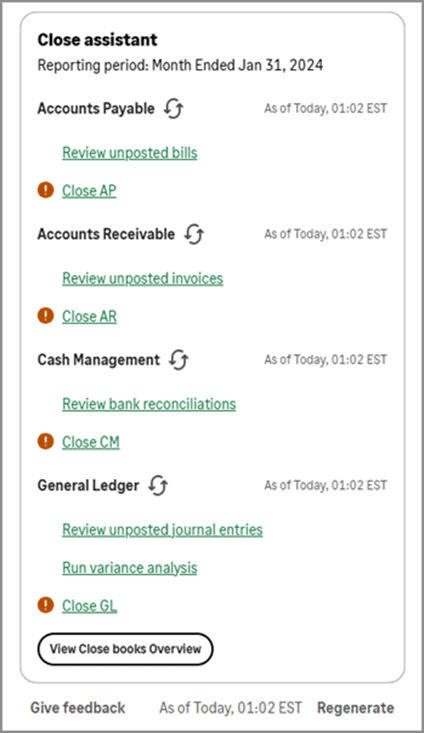
For those in the Early Adopter program, this release also sees the Copilot Close Assistant being made available.
The Close Assistant supports you through your ledger close process by displaying a list of applications and their relevant tasks related to closing the books, all with real-time status tracking so you can see at a glance which tasks are outstanding. It will even provide alerts where you have invoices or journals that have not yet been posted.
For more information on this topic, click here!
Accounts Payable
AP Automation in Purchasing
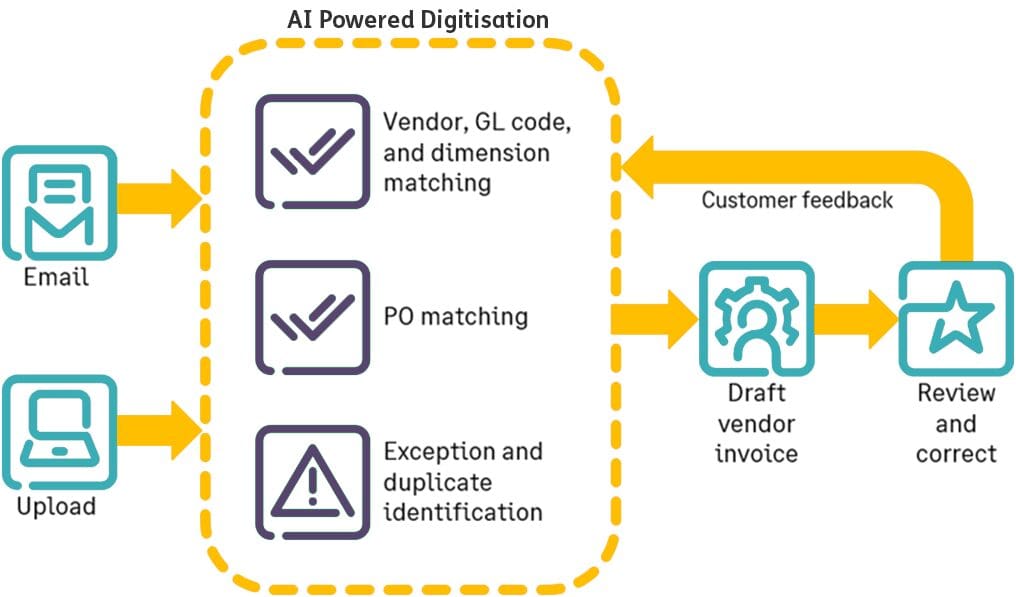
Following a successful early adopter program, the AP Automation add-on has now been made generally available, bringing with it the ability to simplify the handling of incoming purchasing transactions through automated drafting of the incoming supplier invoice and the matching of it to any existing records, such as purchase orders.
By uploading or emailing your supplier invoice, the system can then leverage it’s artificial intelligence capabilities to detect the supplier and match the invoice to an existing purchasing transaction, drafting the invoice transaction in the system and attaching the uploaded document. The lines of your invoice will populate from the content of the matched source transaction.
It’s then just a case of your team reviewing the draft invoice matches the uploaded document, making any corrections that may be required, and then posting the invoice.
The system will even take your corrections and feed them into the AI model, driving continuous improvement in it’s matching capabilities.
Any transactions that have been created through AP automation will sit in their own list within the Accounts Payable and Purchasing applications, providing an easy way of identifying transactions that have been raised in this way.
Supplier-based Approvals
With this release comes a new way of routing your invoices – based on the supplier.
When supplier-based approvals are configured into your approval policy, approvers can then be assigned to your Supplier records ensuring that any invoices raised against those Suppliers route to the specified approver’s queue.
If there is no approver assigned for a supplier then the invoice will be approved automatically.
If you already have approval routes configured, your supplier-based approval can be worked into your existing approval policy with the approval routes executing in the order in which they are configured.
Purchasing
Enhancements to approval delegation
To date, the system has supported the ability to delegate your purchasing approval responsibilities to another approver. Delegation is enabled through the Approval Delegation section of the individual user’s preferences screen.
Following this release, as well as enabling delegation you can also specify a specific start and end date for the delegation to be in place – useful if you’re heading off on holiday, or know you’ll be unavailable for a set period and don’t want to worry about remembering to turn it off again upon your return.

For more information on this topic, click here!
Edit tax information in Purchasing draft transactions
As a result of the AP automation functionality introduced in this release, Intacct has also changed the point at which tax is validated for Purchasing transactions. As a consequence of this, fields relating to tax will no longer be validated while a transaction is in a draft state.
This brings a benefit in that you can now work on draft transactions without the need to have selected a tax solution or schedule until the point at which you are ready to post the transaction, allowing you to save draft transactions with fewer details needing to be provided.
Accounts Receivable
Enhancements to AR Statements
Following on from the last release bringing us the ability to include running balances and currency symbols in AR Statements, this release sees Sage make further enhancements to the customisation available to these printed document templates.
AR Statements can now include any custom fields you have on your Customer records, the header of your Invoice transactions, and the header of your AR Adjustments.

Cash Management
Bank transaction assistant: Draft payments
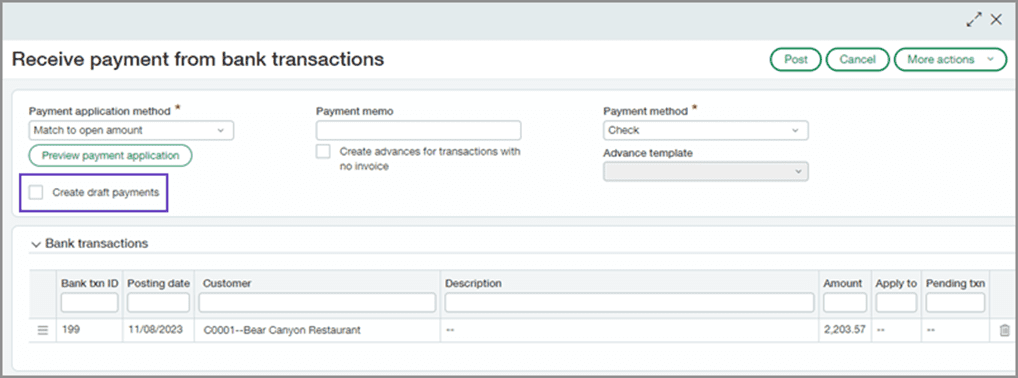
Building on the bank transaction assistant functionality already available in Intacct, this release now introduces the ability to create draft customer payments for instances where you don’t yet want to post them.
This can be done by selecting the Create draft payments checkbox when assigning transactions to a customer record.
Fixed Assets Management
Transfer assets within an entity
Beginning with this release, you can now transfer assets between your Dimensions.
Transferring an asset will automatically create the journal entries needed to update the Dimensions in the General Ledger ensuring that there’s no manual component required.
Any asset transfers will be recorded on a new Transfer History tab, ensuring an audit trail is maintained.
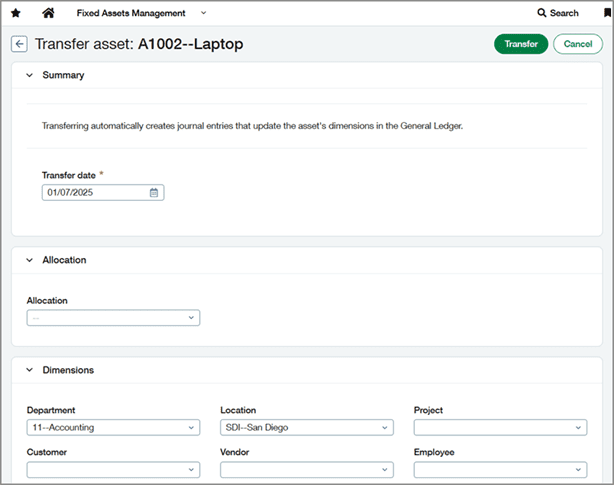
Note that currently assets cannot be transferred between locations, transfers can’t be reverted, and assets can’t be placed back in review following being transferred.
For more information on this topic, click here!
Increased maximum useful life
Also included in this release is an increase to the maximum useful life an asset can have. Previously limited to 500 months (100 years), if you have long-term assets that depreciate over a more extended period you can now assign a useful life of up to 1,500 months (125 years) in your depreciation rule.
For more information on this topic, click here!
General Ledger
Prevent direct posting to individual journals
Within the General Ledger application, it has been possible to prevent direct posting to specific General Ledger accounts, useful in managing the risk of discrepancies arising between sub-ledgers and General Ledger.
With this release, this functionality has now been extended to also become available for use on individual Journals.
Available in the journal setup, selecting to disallow direct posting will prevent users from being able to create entries for the journal from within the General Ledger application. Any postings to the journal will instead need to come from the sub-ledgers.
Note that this will also prevent journals from being created through import and API methods.

Conclusion
We hope you enjoyed our highlights from the Sage Intacct R1 Release and hopefully found some useful updates for you and your colleagues.
If you are a Sage Intacct end user and you have any suggestions or ideas for updates you want to see in Sage, you can have your say by clicking this link. You might see your suggestion in the next Intacct update!
We’re hosting a seminar on [Date and time], to go over the latest features and enhancements in Sage Intacct, and we’ll also take a brief look back at some of the standout features introduced in Sage Intacct throughout 2024, highlighting the advancements that have helped finance teams achieve more. If you’re an itas customer, please be on the lookout for an email with all of the sign up details!
Are you looking at Sage Intacct as your next finance platform? Find out if it’s the right solution for you! We provide on-demand demos that allow you to see the features and learn more about the system.


Matthew is one of our Sage Intacct Junior Consultants, working with clients to implement Sage Intacct solutions. With a background in technology implementations, Matthew has years of experience scoping, configuring, and training systems across multiple business functions.
In his spare time, he likes to take his dog for long walks when he’s not watching his favourite football team get beat.
