
It is full steam ahead with Sage Intacct as we swiftly make our way through the springtime to the latest release from Sage.
May 2025 will introduce exciting new features and enhancements to how you use Sage Intacct and enable you to get the most out of the product.
This release is packed with features, from system recommendations in your reports to new ways to record customer refunds. We aim to highlight some of the changes from this release, but if you would like to explore the full release, the release notes are available here.
Release Spotlight
Record Customer Refunds (Coming Soon!)
This feature comes from ideas put forward by the Intacct Community.
Community Ideas are a driving factor for the improvement of Sage Intacct, and in this release, Sage is releasing the new Customer Refunds functionality for Early adopters.

This new feature will streamline the refund process by enabling you to post a refund from a single list of available credits, avoiding the additional manual journals.
To try this new feature, please reach out to your Customer Success Manager to join the early adopter program.
Release Highlights
Sage Fixed Assets Management
Transfer assets between entities, revert transfers, and more.
This release builds on the previous functionality introduced in the February R1 release by enhancing the transfer between entities functionality.
You can now transfer assets between entities from the top level (as long as the two entities share the same base currency and the asset is Ready for Review or In Service).
With the latest enhancements, you will now be able to revert these transfers directly in the Fixed Asset Management, saving time and reducing complexity.
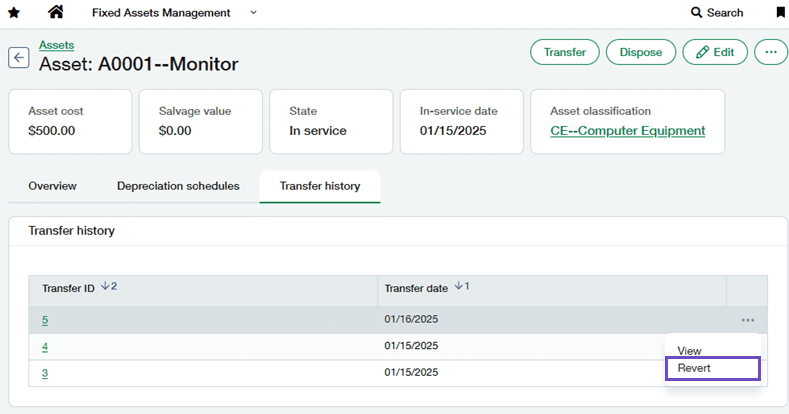
There has also been an update to the way Intacct handles transfer journal entries for assets that have multiple depreciation schedules. Now, when transferring an asset, Intact will automatically create:
1. A journal entry for the asset’s cost using the transfer journal
2. Journal entries for accumulated depreciation for each schedule using the journal in the schedules rule.
This change and automation reduces the manual journals previously required.

Sage Fixed Assets Management
Custom Declining Balance depreciation
This release introduces two new depreciation methods for Sage Fixed Asset Management:
1. Custom Declining Balance with True-up (CDBT)
2. Custom Declining Balance without True-up (CDB)
This improvement will provide greater flexibility when managing your assets and enable you to maintain your existing processes when moving to Sage Fixed Asset Management.
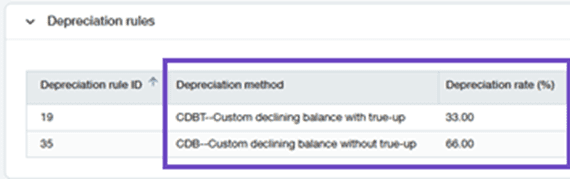
When using a custom depreciation method, a new field will become available called Depreciation Rate. In this field, you can enter your desired depreciation rate as a percentage (i.e., 10%, 100%).
This will typically result in the calculation: (Asset Cost – Salvage Value – Accumulated Depreciation ) * Depreciation rate.
With the introduction of the True-up functionality, Intacct can automatically apply the remaining depreciation in full in the final period. This means the depreciable cost is accounted for within the schedule.
New Affiliate Entity dimension – General Availability
The May release will make the new Affiliate Entity dimension generally available for all users in Sage Intacct.

Available with a Consolidations subscription, the Affiliate Entity dimension enables you to enhance your inter-entity reporting. By using the inter-entity mapping, Intacct will automatically post the affiliate entity in transactions.
Optimise the Performance of Financial Reports
This release brings more enhancements to the Financial Report Writer. From May, when you create a new report and save it, Intacct will now analyse the report and offer recommendations to improve and optimise the report.
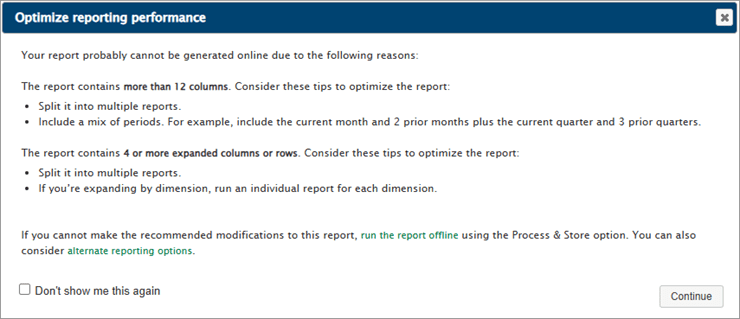
Intacct will look for certain criteria that will flag a support message. Some examples of this criteria could be:
• More than 12 columns
• Four or more expanded columns/rows
• A column expanded by a dimension with more than 100 values.
The messaging that will appear will be based on this criteria and can provide guidance on changes that can be made to make the report run faster.
Other improvements
Accounts Payable: Warning when voiding a reconciled transaction
Another idea from the Intacct Community will be available in this release. Intacct will now have an additional warning that will notify the user if they attempt to void a payment that has already been reconciled.
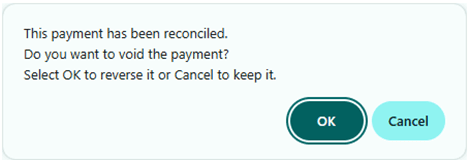
Accounts Payable: New rule type for Named Users in bill approvals
An improvement is coming to approvals, which will make approval policies easier to read and maintain.
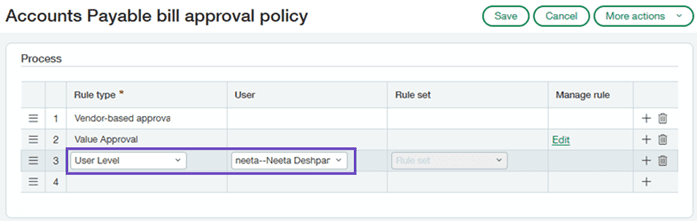
This change will remove the mix of rule types and users in the Rule Type column and will push named users into their own column.
Accounts Receivable: Inter-entity bill back now supports child locations
This change will enable you to create bill back invoices with more details location coding, which will support your reporting further by adding granularity where required.
Cash Management: Retiring the classic import for reconciliation
With this new release, the way bank transactions are imported into Intacct for reconciliation is going to change by retiring the classic import method. In its place, users will switch to the newer Bank Transaction Assistant file import, which comes with its own benefits:
• Imported Transactions are centralised for all accounts
• Transactions that are imported remain in Intacct with a status of Unmatched/Matched for greater visibility
• More flexibility from supported file formats
• Greater control through permissions,
Sage Intacct plans to retire the Classic Import method no earlier than May 2026, but now is the time to transition to the latest Bank Transaction Assistant File Import. If you would like to make this change, please reach out to your Customer Support Manager.
Conclusion
This is a summary of our favourite bits from the R2 May 2025 release, and it is clear that the best ideas come from end users such as yourselves.
With that in mind, if you are a current Sage Intacct user with ideas for any improvements, click here and have your say on what features you would like to see developed for future updates!
And finally, if you’re not a Sage Intacct user but enjoy having a nosey at the new features in Sage Intacct, we have an on-demand demo that allows you to pick the features you’re interested in learning more about. You can check it out here!


Sophie is part of the itas marketing team, working across campaigns, anything creative, and running our social media accounts!
Sophie usually spends her days either working, drawing, or gaming. When she’s not at her desk, she will be out and about walking her dog, Cooper, or cuddling on the sofa with her cat, Rex!
