
Revenue recognition can be a great system enhancement and is a must-have feature for any modern accounting system. But what is it? Sage Intacct’s Revenue Recognition (named Revenue Management) is a module that can split out your revenue into the periods it is related to. Before reading on, check out our quick video below on how you can automate your revenue recognition with Sage Intacct!
Outlined below, is our top 5 tips to get the most out of the Revenue Management module in Sage Intacct:
1. Set Posting to automatic
Revenue recognition gives you 2 options. The preferred and more efficient method is to allow revenue deferred to post automatically. This requires trust in the system and in the user inputting the data, but once you make the leap you’ll never look back. The option if you require a little more control is to set it up as manual. This option allows for you to review before posting to the ledger.
2. Automatically Prorate by days
Month-end accruals on sales invoices can become a thing of the past. Intacct revenue recognition can automatically work out what portion of the invoice is in each period. The below example shows an invoice that is for 27/04 to 13/05 with £600 to distribute.
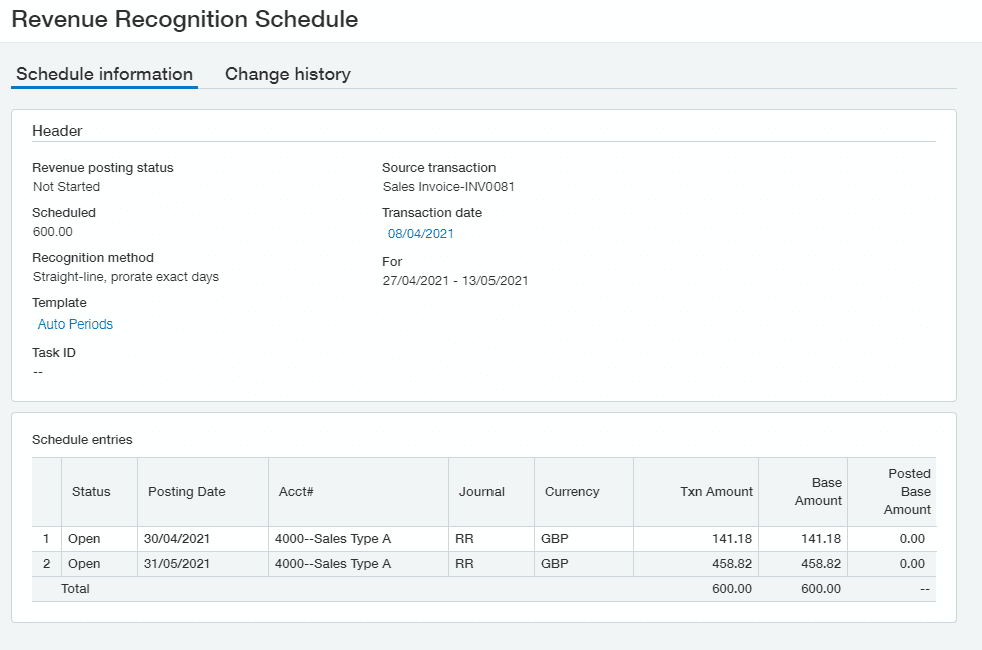
As you can see, the system has automatically calculated the correct portion and posted it at the end of each month. This posting date can be customised to change depending on your requirements. Gone are the days of manually getting your calendar out and trying to work out how much is needed to post in each period. Revenue management takes it one step further and does per line of the invoice, including any dimension that has been tagged.
If you do not need to calculate down to each day in the month, you can split revenue equally on a straight basis.

3. Revenue Management Reports
With the revenue recognition subscription comes a couple of out the box reports. One of these reports is the Deferred Revenue Forecast Report. This report shows all revenue schedules to posting in the future from all invoices. The data can see the forecasted revenue based on any available dimension. The below report shows a forecast by product.

4. Renewal Reminders
As revenue is recognised over a period, it is likely that when all periods have been recognised – the customer may need the service again. The revenue recognition module allows for a renewal reminder to be sent to an internal member of staff, acting as a prompt to reach out to the customer for repeated business. Not only can revenue recognition save you time, but it can also generate revenue itself!
5. Event-based recognition
Some business can’t recognise revenue until an event has occurred. The revenue management module allows you to prevent the revenue schedule from posting until the event has occurred. For example, a project may be invoiced in advance to work commencing, but the revenue cannot be recognised until the customer is live and using the service. To recognise the revenue, it can be as simple as going into the invoice and confirming that it has been delivered.
Definitions from above:
Deferred revenue – revenue that posts to a holding account, until revenue management releases it into the revenue account. For example, an invoice may have a net value of £12,000. This is related to a year’s worth of service. The full £12,000 gets posted to deferred revenue, then £1,000 can be posted to the sales revenue account each month until the full value is removed from deferred revenue.
Revenue Schedule – the frequency and amount that the deferred revenue is going to get posted to the sales revenue account. For example, an invoice revenue may need splitting over 6 months using a straight-line basis (the equal amount each month). Another example is if an invoice covers a week period, the schedule would require to post 2 months but prorate the number of days.
Conclusion
We hope this helps you get a better understanding of the Sage Intacct Revenue Recognition module, if you’re looking into Sage Intacct we have a range of resources that you may find useful, learn more about the other Sage Intacct Modules here, check out our Sage Intacct webinars here (including on-demand demo’s), or request a free, personalised Sage Intacct demo here. As always if you have any questions or if you have any blog/content requests please either give us a call on 01824 780000, get in touch here or email us at info@itassolutions.co.uk


Nathan is one of our Sage Intacct Technical Consultants and is a qualified Sage Intacct Implementation Specialist responsible for delivering product training and enhancements. A graduate with a degree in Economics and Finance and firmly believes that learning never stops. When he is not working hard at his desk, he enjoys watching anything and everything to do with rugby – especially Wales.’
