
Spring has almost sprung and in Sage’s eternal mission to supply you with the reporting tools you need for your business, they have sprung three more reports of the month! Sage listen to all the feedback from their customers and partners and decide on a report they will design and release for free, available to all Sage 200 Professional, Standard Online, and Education customers. Today, we’re covering the free reports for January, February, and March.
If any of the reports in our list have caught your interest, you can download them from Sage’s Report of the Month page. And if you need any help with adding any reports to your Sage 200, check out our free guide from our Sage 200 help guides page. Or, if you have a support contract with us, our support team can happily assist. If you don’t, you can get in touch with our sales team on 01824 780000, option 2.
12 Month Net Purchased by Stock Code
Date: March 2022
Module: Purchase Order Processing
Software: Sage 200 Professional (2015 or above) / Standard / Sage for Education
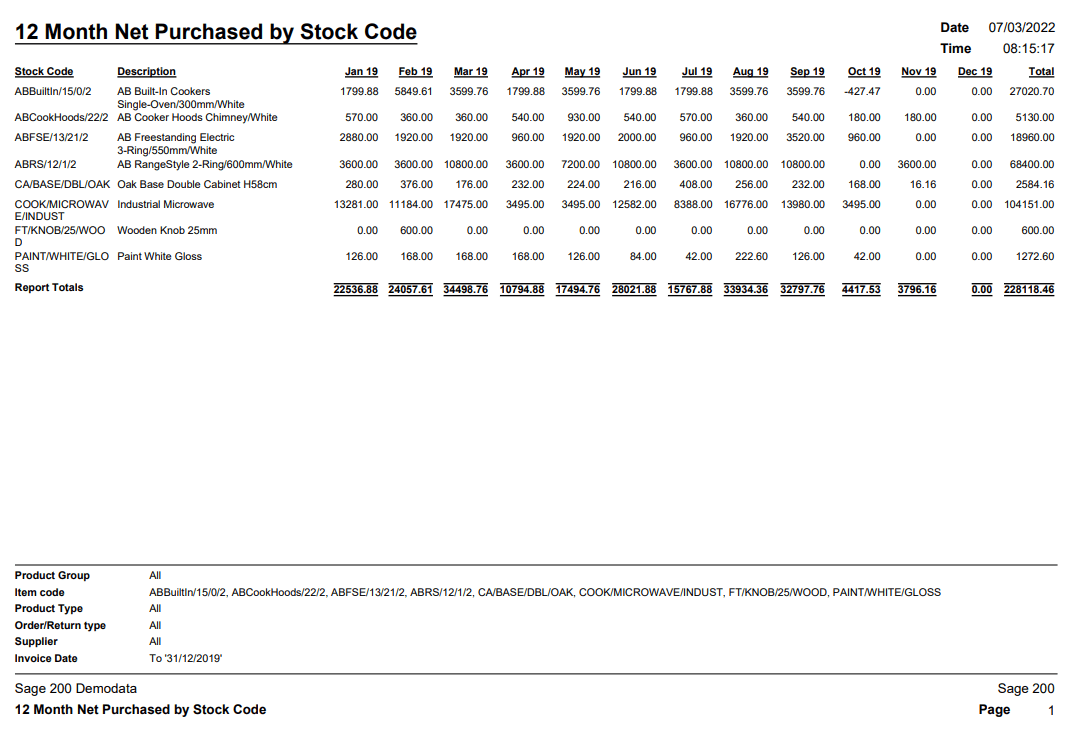
Description: This report is perfect for those keeping an eye on their supplier purchases. Displaying monthly figures and total figures for products in a stock code, you can clearly see seasonal and monthly trends. Run it over previous years and you can see buying trends by year. This is a lightweight report with potentially big answers.
The fields in this report are:
- Stock Code
- Description
- Periods/ months
- Total
- Report totals

12 Month Purchased Quantities by Stock Code
Date: Feb 2022
Module: Purchase Order Processing
Software: Sage 200 Professional (2015 or above) / Standard / Sage for Education
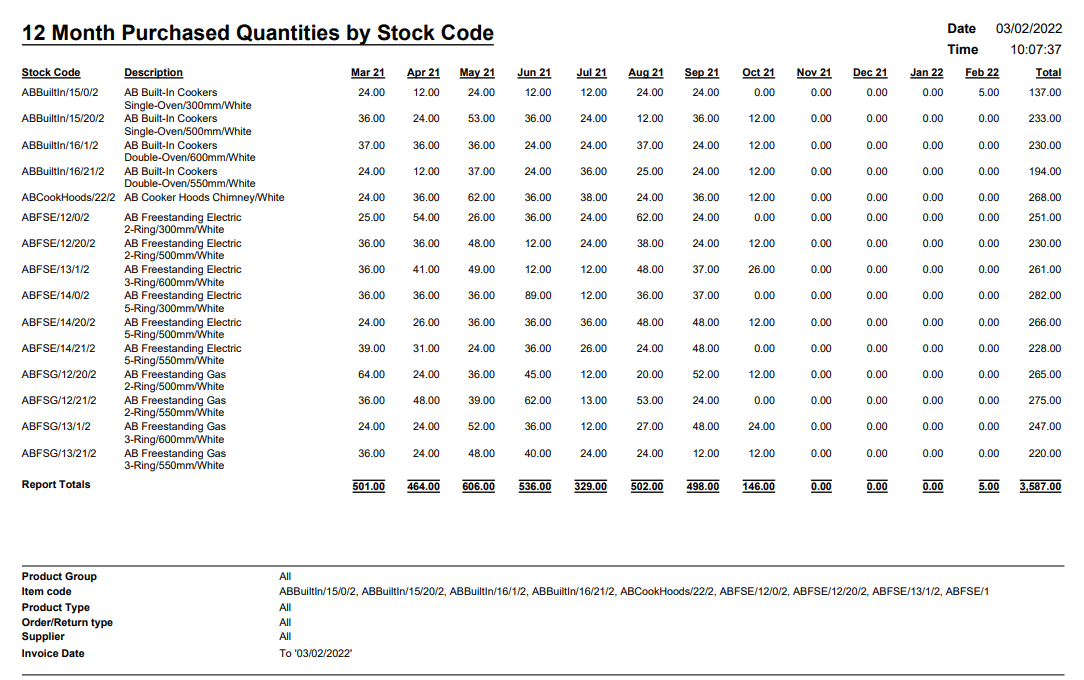
Description: Just like 12 Month Net Purchase by Stock Code, this shows the quantities of purchased goods instead of the monetary figures. Just like the net purchased report, you can use this to analyse buying trends by company monthly and yearly purchased quantities.
The fields in this report are:
- Stock Code
- Description
- Periods/ months
- Total
- Report Totals
12 Month Invoiced Net Sales by Stock Code
Date: Jan 2022
Module: Sales Order Processing
Software: Sage 200 Professional (2015 or above) / Standard / Sage for Education
Description: We’ve covered two Purchase Order Processing reports, it’s time to look at Sales Order Processing. Similar to the other two reports we’ve discussed, this shows the monthly figures for a stock item. Again, this could be a handy report for showing sales figures for individual stock items. The quantity version of this report was covered in our Sage 200 Free Report of The Month – Winter 2021 blog.
The fields in this report are:
- Stock code
- Description
- Periods/ months
- Total
- Report Totals
How to request a report from Sage
If you can’t find the report you were looking for in this blog or want a report that’s a little more tailored to you, you can request a free report from Sage. You do have to be a member of Sage 200cloud Services to receive this benefit, which is included under all our support packages. If you don’t have support with us, you can get in touch with our team on 01824 780000, option 2.
If you do, you can request three free reports from Sage annually. See our list of help and user guides on how to request your free report or ask a member of our support team. These 3 free reports cannot be carried over to the new year so get them in while you can!
If you have any questions about reporting in Sage 200cloud, or would like to learn to build your own reports why not take a look at our Sage 200 Report Designer Course!
Useful Links
- Sage 200 Professional
- Sage 200 Standard Online
- Previous quarter’s reports of the month
- Sage 200 Report Design Services – Report of the month
- How to add a report to your Sage 200 system
- Free Sage 200 Report Designer E-course
- Sage 200 Report Designer Training Course
- Get in touch with our team


Jamie is a passionate and supportive member of the ITAS support team! He likes to keep his hands busy with hobbies like model-making and web development and is always keen to develop new skills.
When Jamie’s not working hard on a project, he’s enjoying the Welsh countryside by walking its many trails or fishing in its many picturesque lakes.
