
The Sage Intacct 2024 R4 release is here, bringing a fresh wave of enhancements and it’s as refreshing as a clean balance sheet. This release is primed to keep your finance team working smoother than a glitch-free app. In this blog, we will explore the standout features and updates in the latest release and how they can be effective for finance teams and decision-makers alike. Let’s dive into the updates!
Release Highlights
Admin
List Enhancements
List views can now be personalised per user. You will need to turn this on manually, if you go to the vendor/supplier list view you can turn on the Lists beta Interface. This will allow you to add, move, and resize columns to your preference. You can also freeze columns and sort columns based on the data you need most. This is currently in the beta testing phase, so it will only be available on certain lists, but Sage does plan to roll this out to all list views.
Customer Learning and Certification
If you perform financial transactions and generate reports in Sage Intacct, Sage is now offering a certification exam and certificate. The exam assesses your knowledge of Sage Intacct, if you pass you will receive a certificate and badge which you can use to enhance your professional brand.
For more information on this topic, click here!
Accounts Receivable
Enhance your Statements!
This idea has been included in the new release due to user requests and demand for the feature. You can now add a running balance to your custom statement templates and display currency symbols alongside values to add clarity for your foreign currency customers.
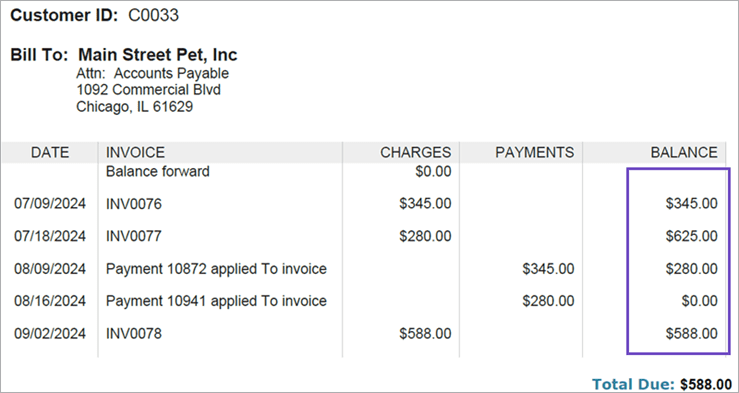
If you are comfortable updating printed document templates yourself, you can amend the default statement template by going to Customisation \ Platform Services > Printed doc templates. If you have never amended the default templates in Sage before, you may want to get some assistance from our support team or your Customer Success Manager.
For more information click on this topic, click here!
Customer Reconciliation
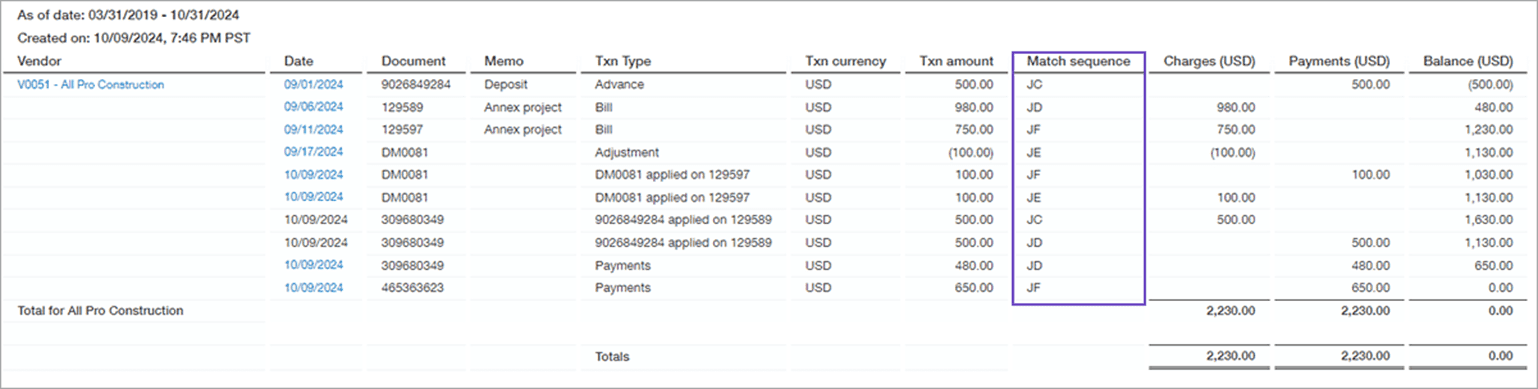
You can now see how payments and credits match Accounts Receivable sales invoices using the customer reconciliation report. Sage Intacct will assign a match sequence, which is known as an alpha document sequence to an AR sales invoice when you apply a payment or credit against an invoice. For example, a payment may be assigned the sequence “AB” You then know that any payment entries relating to the invoice will have the same sequence of “AB”. You will also know if the invoice has only been partially paid as Sage will assign lowercase letters in these instances such as “ab”. Once the invoice has been fully paid it will change the sequence to capital letters.
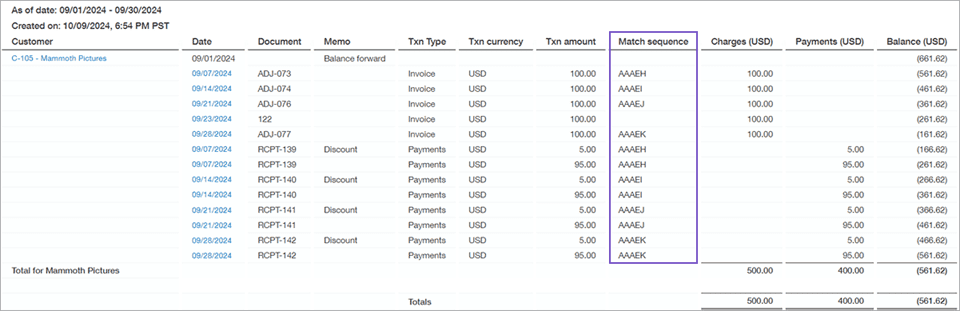
The customer reconciliation report will provide insight into:
- Which payments were applied to an AR Sales Invoice?
- Where was the credit applied?
- Which transactions are shared by match sequence?
- Which transactions have been fully or partially matched?
For more information on this topic and to find out how to set it up, click here!
Accounts Payable
AP Automation Update
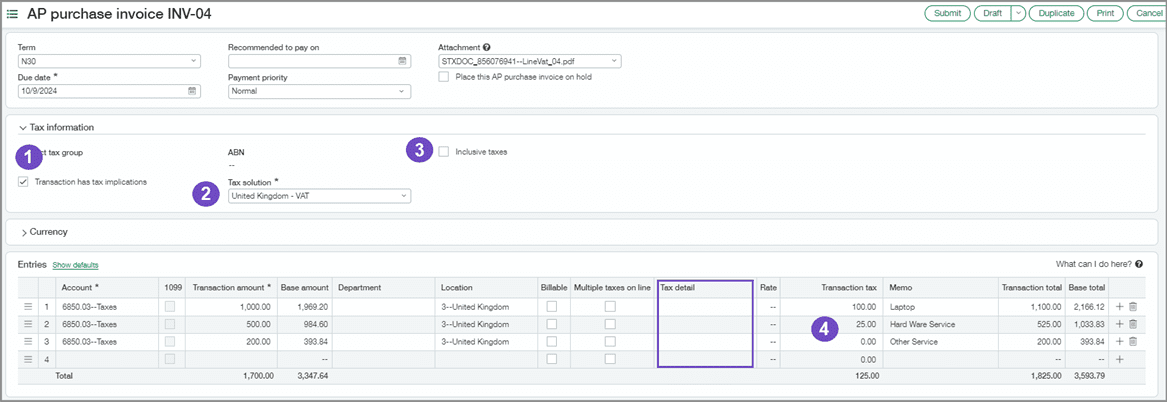
The AP Automation module now supports tax solutions. This means less data entry for you and your team, and who doesn’t love less work? If you aren’t aware of the AP Automation Module, this is a fairly new add-on feature that streamlines the data entry process by creating draft invoices from an AP purchase invoice document, that you either manually upload or send to an email inbox for Sage Intacct. It uses AI to populate the draft invoice from the document. For more information on this add-on click here!
Back to the update, AI can now determine the tax solution to be used on the invoice based on the predicted location!
For more information on this topic, click here!
Supplier Reconciliation
Similarly to the customer reconciliation we talked about earlier, you can now see how payments and credits match to Accounts Payable purchase invoices using the supplier reconciliation report. It uses the same alpha document sequence as the customer reconciliation report to help you distinguish which payments are linked to a purchase invoice and tell you which invoices are partially or fully paid.
For more information on this topic and to find out how to set it up, click here!

Fixed Asset Management
Custom Depreciation methods
A few updates for the Fixed Asset Management Module in this release. Intacct now allows you to create custom declining balance depreciation methods. Two new depreciation methods to assist you in complying with financial and tax regulations across different regions.
You can change the depreciation rate applied to assets that use the declining balance method.
For more information on this topic, click here!
Override posting dates
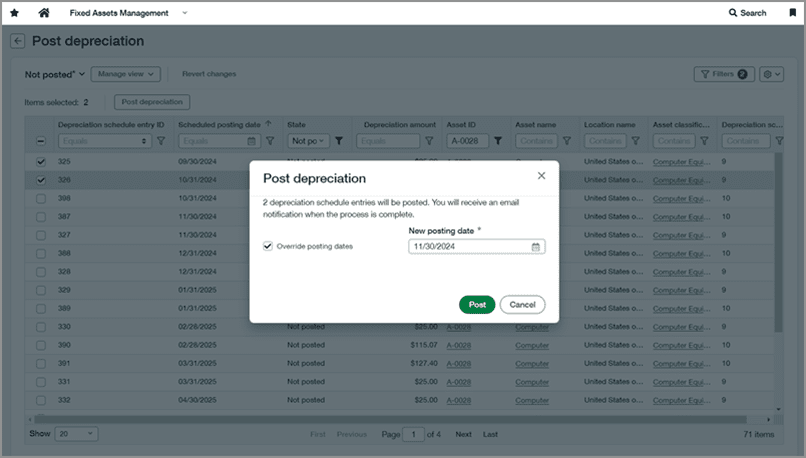
When you go to the Post Depreciation Page to manually post depreciation schedules, you now have the option to change the posting date of the depreciation. This is particularly useful if the entries were supposed to be posted in a period that has now been closed. You can amend the date to an open period, previously you would have had to reopen the book to post the depreciation, which could spew reporting figures.
For more information on this topic, click here!
Taxes
Tax Submission – Early Adopter
If your organisation is using a custom tax solution, Sage has created a new workflow that streamlines the tax filing process. You will be able to track the transactions that are included in the submission, include them in reports, and mark them as filed once you have completed the submission. This will help you to save time and stop duplicate transactions from being included in tax submissions. This is only in the early adopter phase, what this means is Sage can give you access to the feature, and you can provide feedback on how you think it should work or give your opinion on any changes that should be made.
For more information on this topic, click here!
Override Tax Schedules
You can now have the option to override tax amounts and details within the Purchasing and Order Entry modules for any unusual situations you have that may require tax details different from the default setup. Anyone using the Advanced Tax, or a VAT tax solution has the option to override the default tax schedule (subject to permissions of the user). This will allow you to calculate tax for transactions where you may not have a tax schedule set for the circumstances.
For more information on this topic, click here!
Tax Detail for Tax Submission
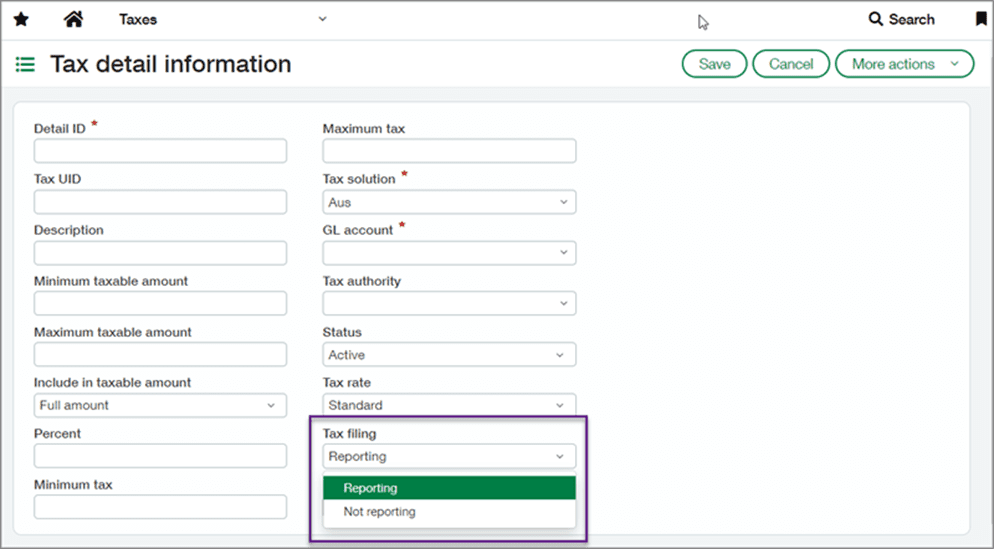
Tax details can be set to be excluded or included in reports. When you create a tax detail you have the option to set it as Reporting or Not Reporting, this means any transactions or lines of a transaction that have a tax detail as Not Reporting will not be included in the tax submission. You may have lines on an invoice that you want to exclude from the tax submission.
For more information on this topic, click here!
Conclusion
We hope you enjoyed our highlights from the Sage Intacct R4 Release and hopefully found some useful updates for you and your colleagues.
If you are a Sage Intacct end user and you have any suggestions or ideas for updates you want to see in Sage, you can have your say by clicking this link. You might see your suggestion in the next Intacct update!
We’re hosting a seminar on Wednesday 4th December at 2pm GMT, to go over the latest features and enhancements in Sage Intacct, and we’ll also take a brief look back at some of the standout features introduced in Sage Intacct throughout 2024, highlighting the advancements that have helped finance teams achieve more. You can learn more about this seminar, here!
Did you enjoy this blog? If you’re looking for more information about Sage Intacct, we have a quarterly newsletter that would be perfect for you. The newsletter will include links to the latest blogs, webinars, and free downloadable guides to help you get the most out of your Sage software.
Are you looking at Sage Intacct as your next finance platform? Find out if it’s the right solution for you! We provide on-demand demos that allow you to see the features and learn more about the system.


Callum provides 1st line support for all our Sage software solutions. As a newer member of the Itas family, he is always looking to improve his knowledge around Sage and is learning about new modules and add-ons regularly.
When he’s not in the office, he enjoys to be outdoors, you’ll either find him playing football or riding his mountain bike around a forest.
