
May sees the introduction of the second Sage Intacct release of the year, and with it come plenty of fantastic new features and enhancements to improve your Sage Intacct experience.
In this blog, we will explore some of the highlights from the release and how they can help improve your financial operations.
Custom Purchasing approvals – Early Adopter
The feature to kick off R2 2026 is the new Custom Purchasing approvals – Early Adopter. Custom Purchasing approvals allows you to set up Purchasing Transaction Approvals based on supplier attributes, payment priority, and transaction amounts.
This new update to Sage Intacct provides you with flexible approval criteria, and Audit-ready visibility by maintaining transparency with a built-in audit trail in your transactions and approval history to help support compliance.
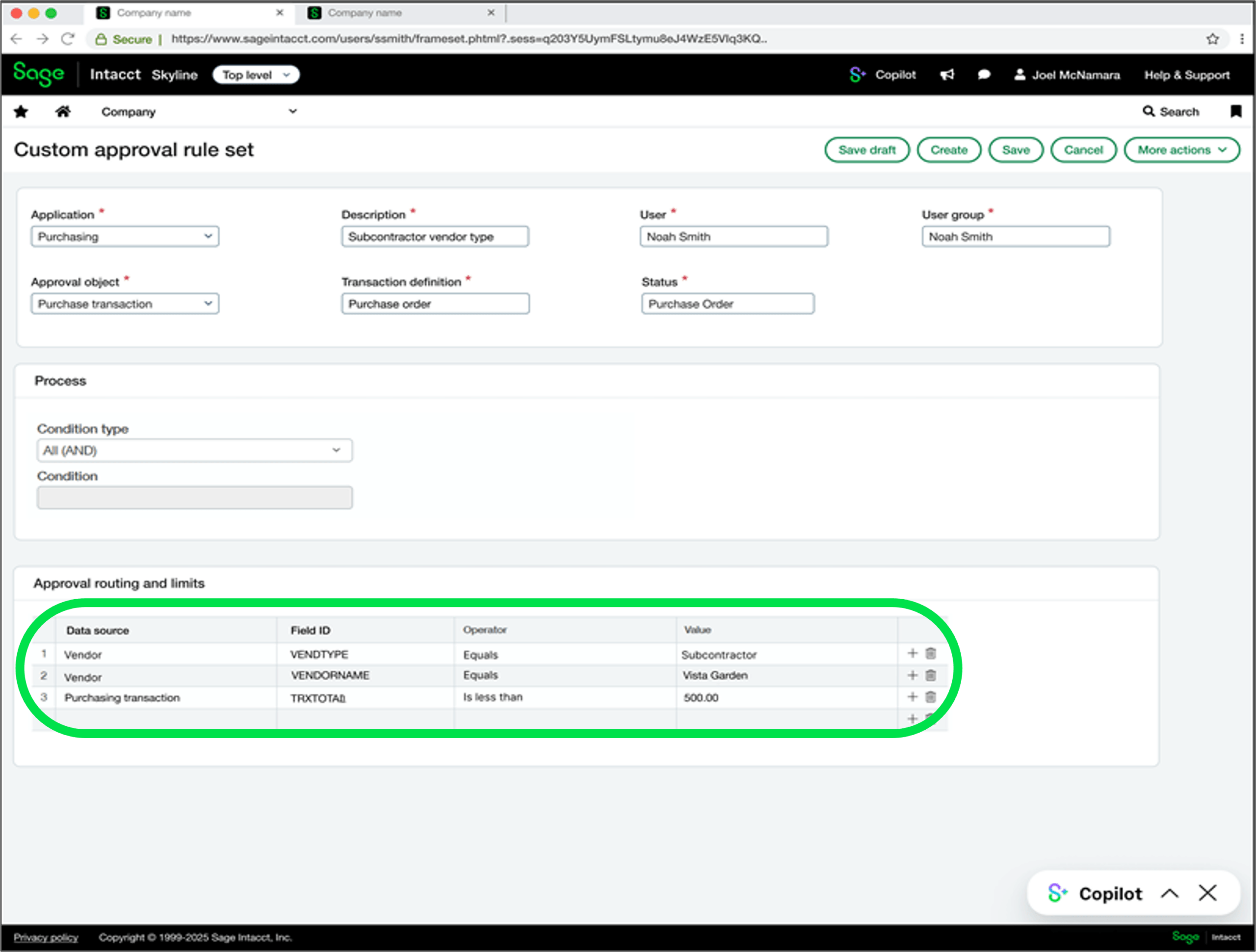
Approval rules run sequentially (in order), not concurrently (all together), based on the order defined in your approval policy.
Currency in payment posting
R2 2026 will introduce new enhancements to multi-currency payment posting in Accounts Payable (AP).
You can now distinguish between the bank account currency for the payment and the AP purchase invoice currency. This enables you to follow the money trail more easily when posting multi-currency payments.
You will notice field name enhancements in UI pages such as the following:
- Posted payments
- Payment requests
- AP Advances
- Manual payments

Alongside this, R2 2026 has also introduced Currency in cash receipts which is the has the same changes but for Accounts Receivable (AR).
You will notice field name enhancements in UI pages such as the following:
- Bank currency
- Bank amount
- AR sales invoice currency
- AR sales invoice amount

Split an asset into multiple assets
A new feature to ‘Fixed Asset Management’ in R2 2026 now allows you to now easily manage assets that need to be tracked separately. You can now split an existing asset into up to 20 independent assets! All while preserving depreciation accuracy and history.
This gives you more flexibility to manage depreciation, transfers, and disposals. Fixed Assets Management automatically recalculates values and maintains a clear link between the original asset and the assets created by the split.
This new feature allows for greater asset flexibility, provides accurate deprecation calculation – such as: Salvage Value Recalculated Cost and Deprecation.
This allow eliminates workarounds and manual adjustments when assets need to be tracked, transferred or disposed separately.
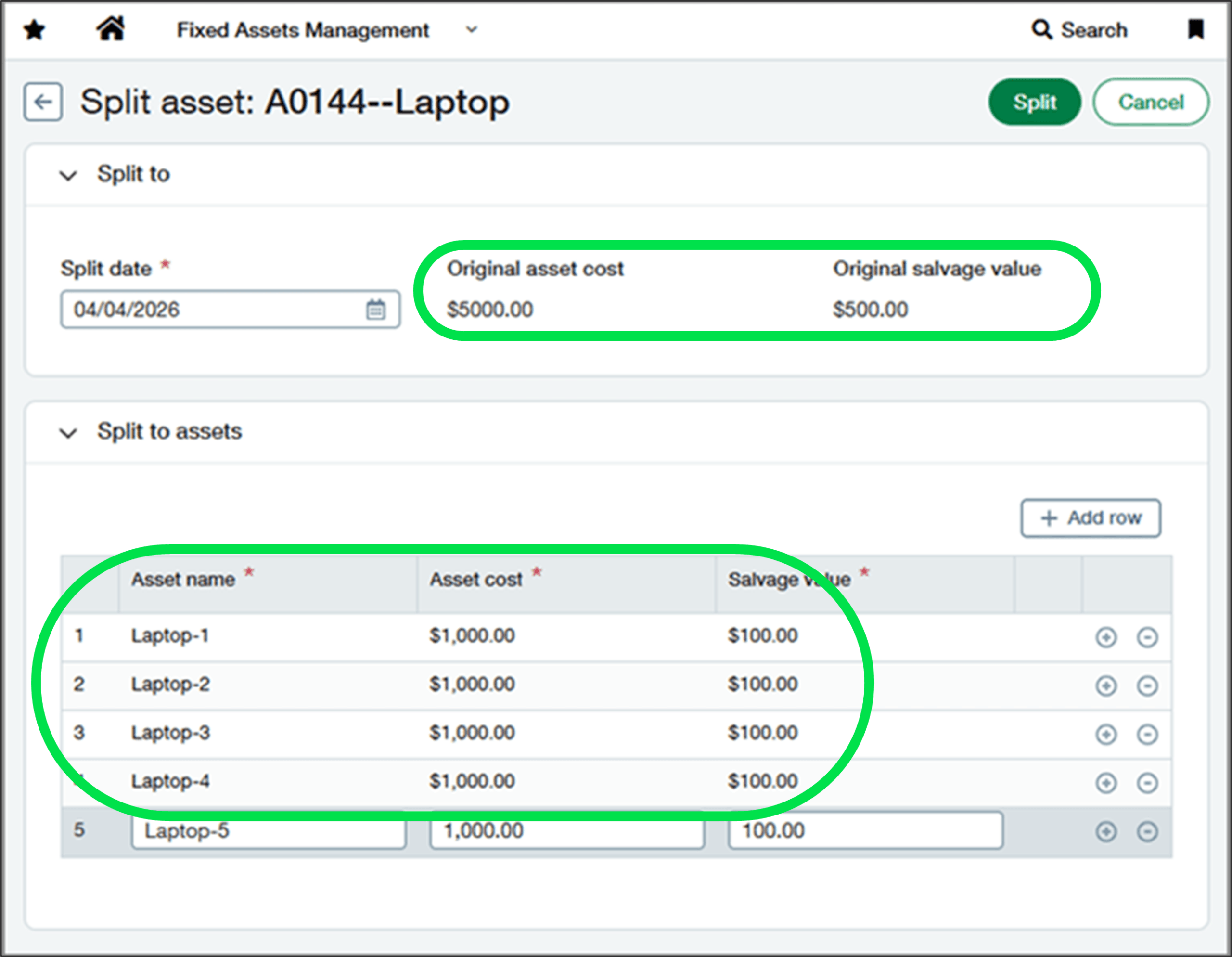
*The original assets’ Name, Cost and Salvage Value. **This is the line detail where you can split the Asset’s Name, Cost, and Salvage Value of the Original Asset.

Cash requirements one-touch customer payment reminders – Early Adopter
A new time-saving enhancement in R2 2026 introduces an early adopter to Cash Management. The new Cash requirements feature lets you view amounts for payables, receivables, and bank balances on a single page and allows you to send automatic payment reminders to selected Customers.
The new ‘Create payment reminders’ button in the Cash Requirements page which allows you to see all customers with outstanding invoices and send them payment reminders with a single click.
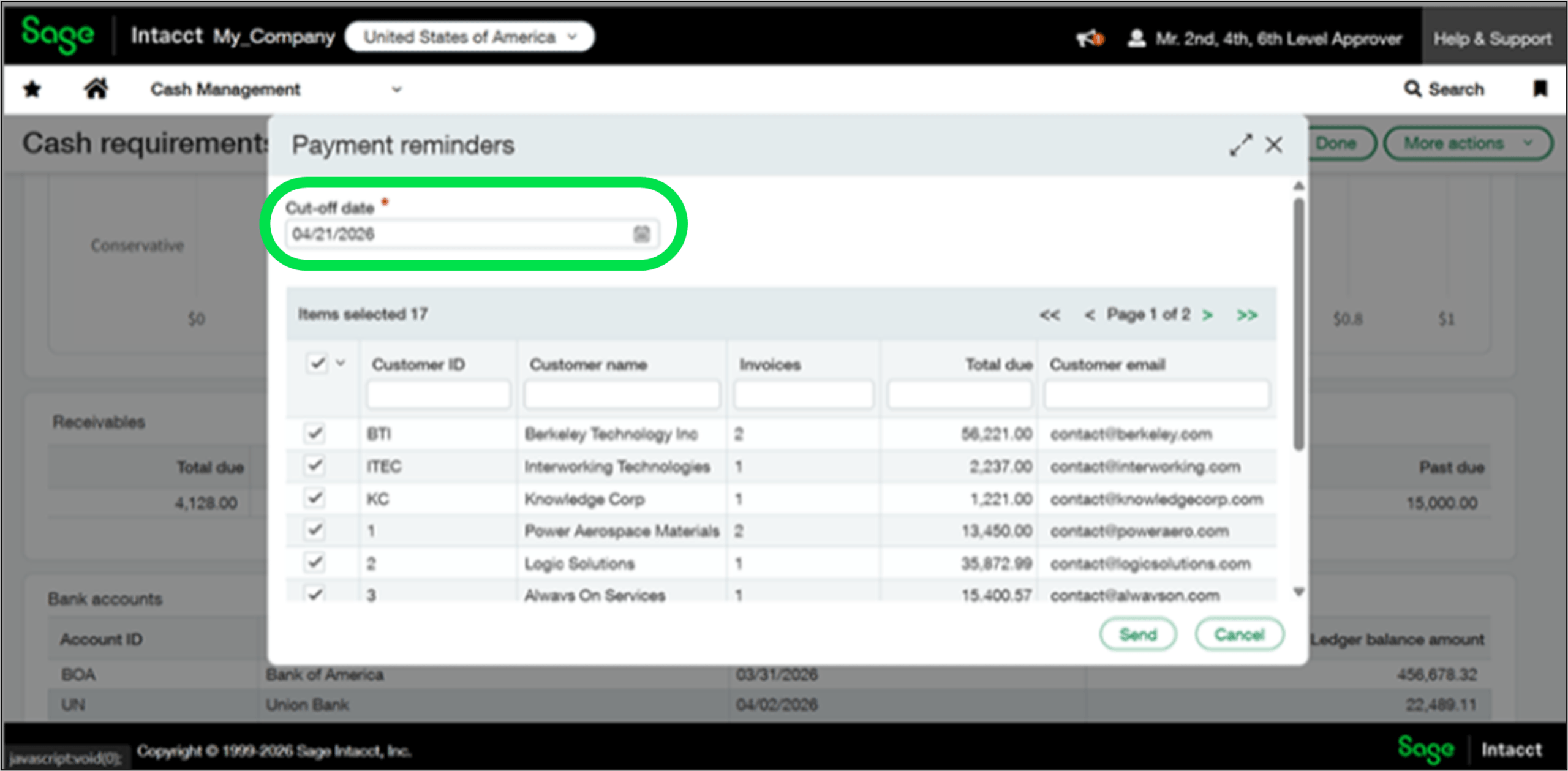
The Cut-off date will list all customers with open invoices due on or before the specified date.
Track inventory transfers more securely
Warehouse transfer transaction definitions have been added to Inventory Control in R2 2026.
Previously you could only track, Inventory Transfer In & Inventory Transfer Out. Now you can track, SYS-Warehouse Transfer In, SYS-Warehouse Transfer Out, & SYS-Warehouse In Transit.
This allows for increased inventory activity tracking compared to Inventory transfer transaction definitions.
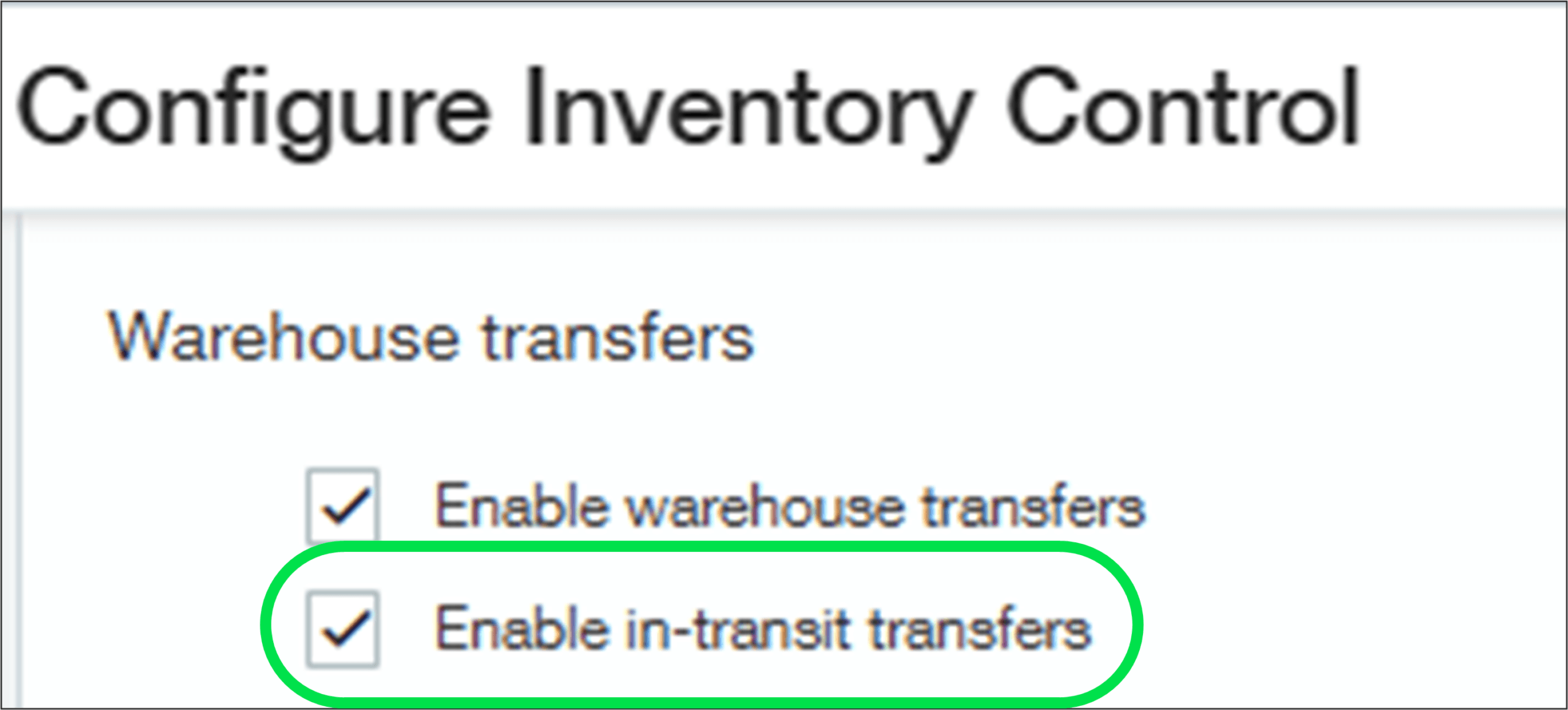
To use this new feature, you must first ‘Enable in-transit transfers’ in: Inventory Control>Set Up> Configuration.
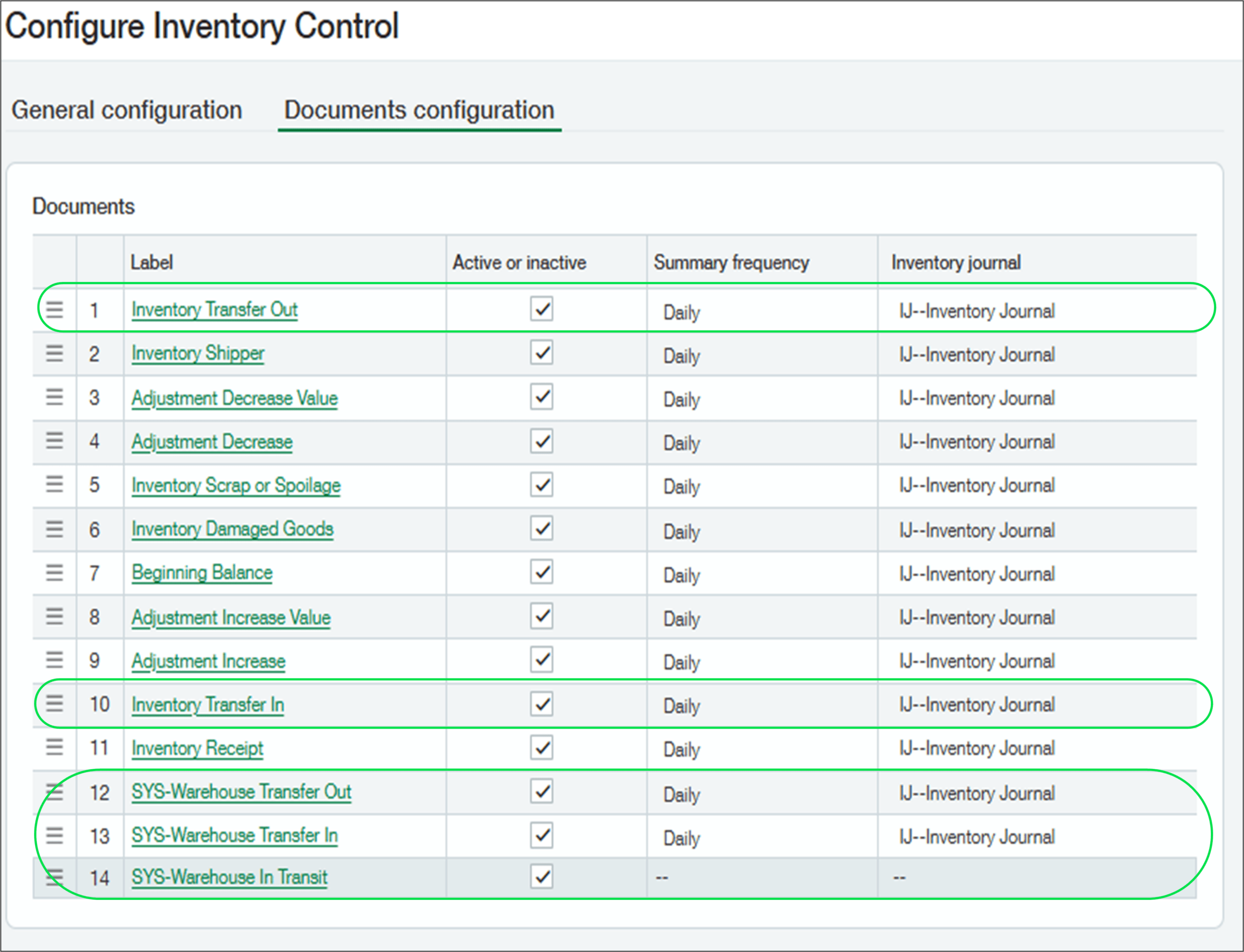
* If you are using this new feature, please ensure that the two highlight definitions are made inactive. To ensure this does not become an issue Sage will stop supporting these TDs. **These are the new Warehouse transfer transaction definitions.
Customise sender & reply‑to email addresses for Order Entry communications
The release of R2 2026 has also introduced customised sender & reply-to email addresses for Order Entry. This prevents unauthorised/incorrect sender addresses for your sales transactions.
Now the Sales email workflows now use a picklist, rather than a free-text entry, for ‘Sender’ and ‘Reply to’ that are populated only with allow‑listed email addresses.
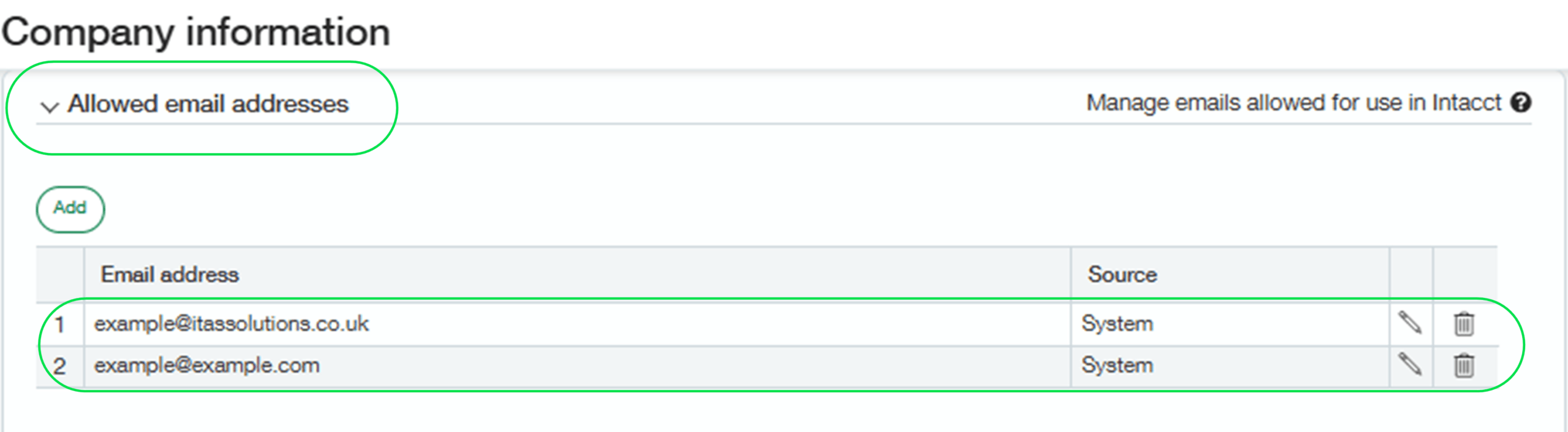
Admins can set authorised email addresses in Company>Set Up>Company>Security, scroll down to ‘Allowed email addresses’ and entering all approved email addresses.
Conclusion
This has been an overview of some of the highlights from the R2 May 2026 release.
If you are a current Sage Intacct user with ideas for any improvements, click here and have your say on what features you would like to see developed for future updates!
And finally, if you are not a Sage Intacct user but enjoy having a nosey at the new features in Sage Intacct, we have an on-demand demo that allows you to pick the features you are interested in learning more about. You can check it out here!


Kane is a proud and enthusiastic member of the itas team, drawn in by both the exciting work and the wonderful people. He’s looking forward to growing his knowledge and building meaningful relationships with his colleagues along the way.
Outside of work, Kane is a man of many talents! He produces his own music spanning a eclectic range of genres, from Lo-fi and Grunge all the way to Neurofunk. When he’s not creating music, you’ll find him on the squash court, out fishing with his dad, or enjoying a well-earned pint at the pub on the weekend!
