
We’re already well into February, and with that comes Sage’s first Intacct release of the year.
R1 brings both new features and enhancements to existing functionality to improve your Intacct experience and streamline your finance operations.
In this blog, we’ll take a look at some of the highlights!
Line-level approvals for Purchasing (early adopter)
To date, approvals within the Purchasing module have only been capable at the transaction header level. Following this release, Intacct now has the ability to instead base approvals on the line detail of a transaction.
This introduces opportunities for creating more granular approval routing, with the ability to split transactions for approval.
When configuring approval policies within the Purchasing configuration screen, you will now see three additional Rule Types available to configure:
- Line level approval by Department
- Line level approval by Location
- Live level approval by Project
Manage Projects
New Manage Projects functionality has also been introduced to support the updating of information across multiple projects in bulk. Previously, updates to Projects have had to be performed manually on a per-Project basis.
Now, users with the Manage Projects permission can select multiple Projects at once from the Projects screen, and then use the Update fields feature to bulk update characteristics of those selected Projects at the same time:
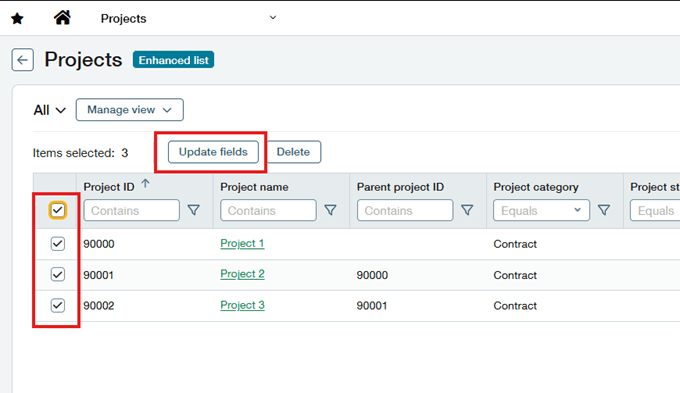
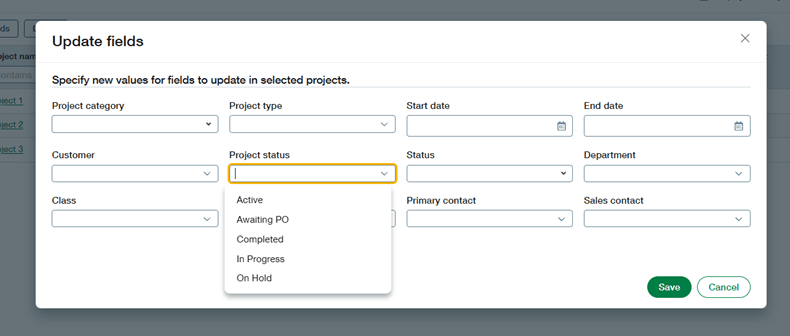
This can be useful in situations where, for example, you might need to mark multiple Projects as Complete at the end of a period, or else update their Dimension values or contacts.
Line-level matching for AP Automation
This release also sees general availability for line-level document matching within the AP Automation, introducing a new way of automating transaction matching within the Purchasing module.
With line level matching, the system will:
- Match the supplier invoice to the source Purchasing transaction
- Populate line items in the target transaction by extracting the data from the uploaded or emailed supplier document
- Flag any differences between the price or quantity of the supplier document and the source transaction
From within the Purchasing configuration screen, administrators can enable line-level matching by enabling the new configuration option of ‘Override header-level matching with line-level matching’.

AI enhancements to the Sage Intacct Import Service
Last year, Sage introduced the Sage Intacct Import Service as a means of importing data into the system in a more controlled way, providing a workspace to import and resolve errors.
This release see AI enhancements introduced to further improve the import experience.
New enhanced mapping functionality enables you to:
- Split or join data in one or more fields – for example, you import a contact name made up first and last name; you can now split this via the import service to also populate the contact first name and last name fields
- Generate new values from the data that you upload – for example, creating email addresses from names
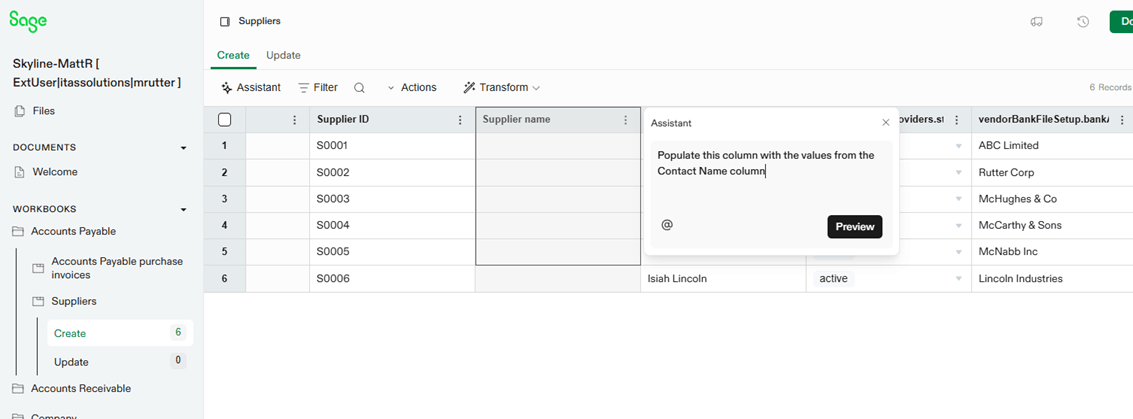
Additionally, a new Transform option powered by AI allows you to prompt the system to perform data transformation tasks and have the system take care of them for you.
For example, you may want the system to automatically take the values from one columna and copy them into another:
Enhancements to Fixed Assets Management
- Manage Construction in Progress (CIP) Assets
Following this release, the Fixed Assets Management module now supports the acquisition, tracking, and capitalisation of Construction in Progress assets.
CIP functionality can be enabled from within the Fixed Assets Management configuraiton screen, and allows you to add a CIP GL Account to Asset Classes, create CIP assets from AP Purchase Invoices and other Purchasing transactions, and then capitalise and place in service CIP assets.
- Change asset costs by raising AP Adjustments
To date, asset costs could only be changed prior to an asset with a status of Ready for Review.
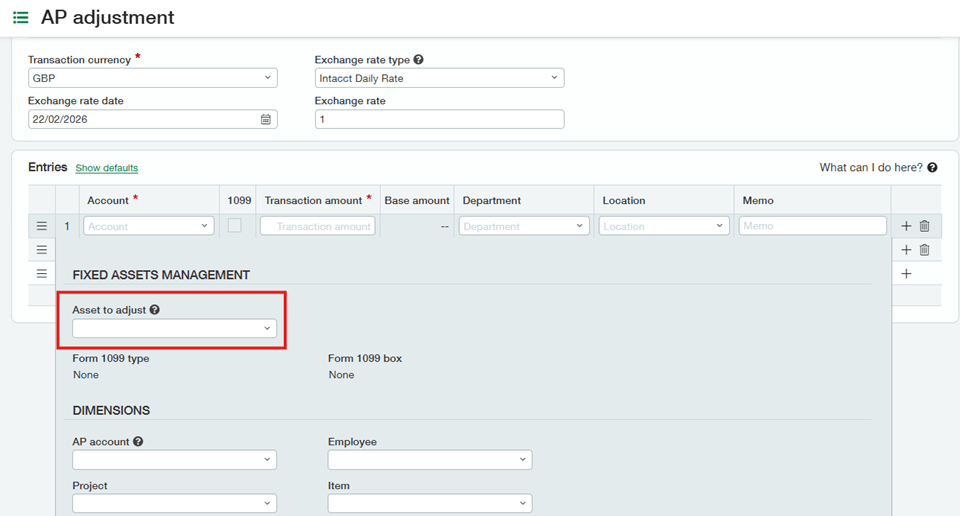
This release has introduced the ability to tie an AP Adjustment to a fixed asset in order to adjust the asset cost associated with it. When raising an AP Adjustment, expanding the line details will allow you to pick the asset that you would like to adjust:
- Roll Forward Report
An additional report has also been created for use within the Fixed Assets Management module, providing visibility into the changes to an asset via additions, disposals, and depreciation, as well as the overall net book value of an asset.

Customer Health Insights
This release also sees some new ways to quickly view the overall health of Customer accounts, offering a way to gain easy visibility into which Customers may require particular focus.
On the Additional Information tab of a Customer record, you will now see the following fields available to populate:
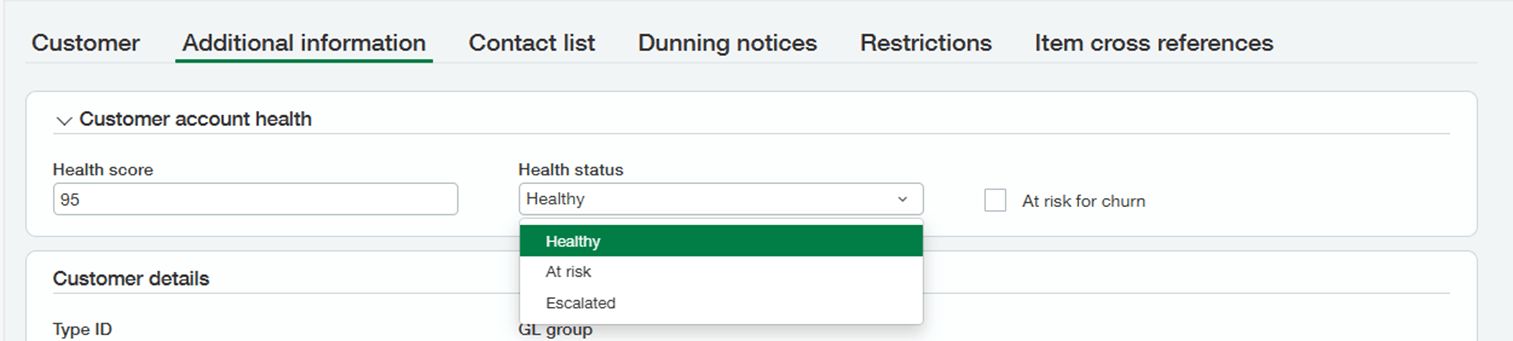
- Health score – this is a figure between 0 and 100, indicating the overall health rating of the Customer
- Health status – this a status of either Healthy, At risk, or Escalated
- At risk for churn – this is a manual field you can use to flag at risk Customers, for example where the Health score falls under a certain limit
These fields can then be included in Views for use in the Customer List screen, or pulled into Custom Reports:

Conclusion
This has been an overview of some of the highlights of the R1 2026 release.
If you are a current Sage Intacct user with ideas for any improvements, click here and have your say on what features you would like to see developed for future updates!
And finally, if you’re not a Sage Intacct user but enjoy having a nosey at the new features in Sage Intacct, we have an on-demand demo that allows you to pick the features you’re interested in learning more about. You can check it out here!


Matthew is one of our Sage Intacct Junior Consultants, working with clients to implement Sage Intacct solutions. With a background in technology implementations, Matthew has years of experience scoping, configuring, and training systems across multiple business functions.
In his spare time, he likes to take his dog for long walks when he’s not watching his favourite football team get beat.
